Salesforce Einstein Review 2026
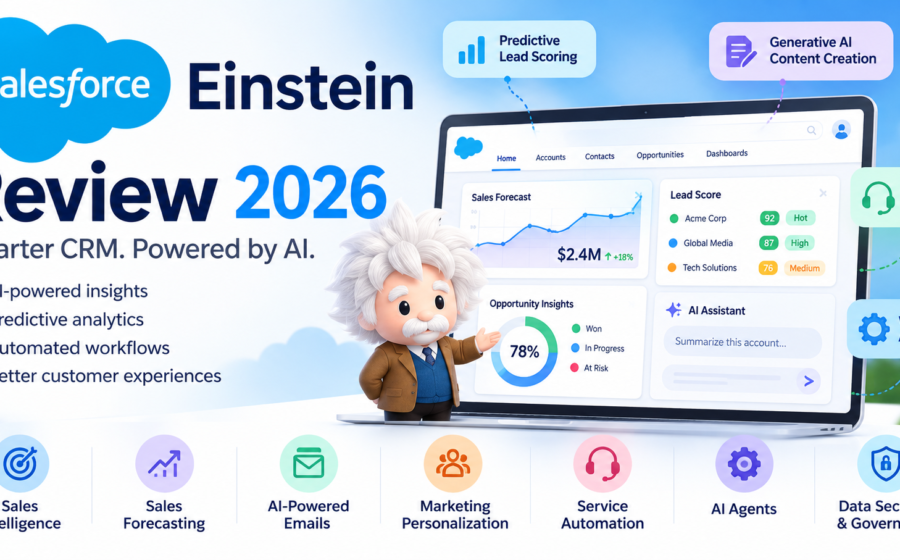
Salesforce Einstein is an artificial intelligence platform designed to make customer relationship management (CRM) smarter, faster, and more efficient. It brings AI-powered predictions, content generation, workflow automation, and intelligent assistance into Salesforce products, helping businesses manage sales, customer service, marketing, and customer relationships.
Unlike standalone AI writing tools or chatbots, Salesforce Einstein works within the Salesforce ecosystem. It can help sales teams prioritize leads, identify potential deals, summarize customer records, generate emails, and analyze sales conversations. Businesses can also use AI-powered capabilities to improve customer support and personalize customer experiences.
Salesforce Einstein has evolved beyond predictive analytics into a broader collection of AI capabilities, including generative AI and AI agents through Salesforce’s wider AI platform. The available features depend on the Salesforce product, subscription, configuration, and add-ons selected by an organization.
However, Salesforce Einstein is not necessarily the right choice for every business. Its value depends on how much a company relies on Salesforce, the quality of its customer data, its budget, and its ability to configure AI features effectively.
So, what does Salesforce Einstein offer in 2026? How much does it cost? What are its biggest advantages and disadvantages? And is it worth using for your business?
Let’s take a closer look in this Salesforce Einstein review.
Table of Contents
Our Rating
| Category | Our Rating |
|---|---|
| AI Features | 9/10 |
| Sales Intelligence | 9/10 |
| Automation Capabilities | 8.5/10 |
| CRM Integration | 9.5/10 |
| Ease of Use | 7.5/10 |
| Customization | 9/10 |
| Pricing and Affordability | 6.5/10 |
| Overall | 8.5/10 |
Editorial assessment based on Salesforce’s publicly documented capabilities, intended use cases, and pricing structure. These are not results from an independent hands-on benchmark. Individual results will vary depending on the Salesforce products and features used.
About Salesforce Einstein
Salesforce Einstein is the AI technology built into the Salesforce platform. It helps organizations use their customer and business data to make predictions, generate content, automate repetitive work, and support decision-making.
Salesforce introduced Einstein as a way to bring artificial intelligence directly into its CRM products rather than requiring businesses to use separate AI software for every task.
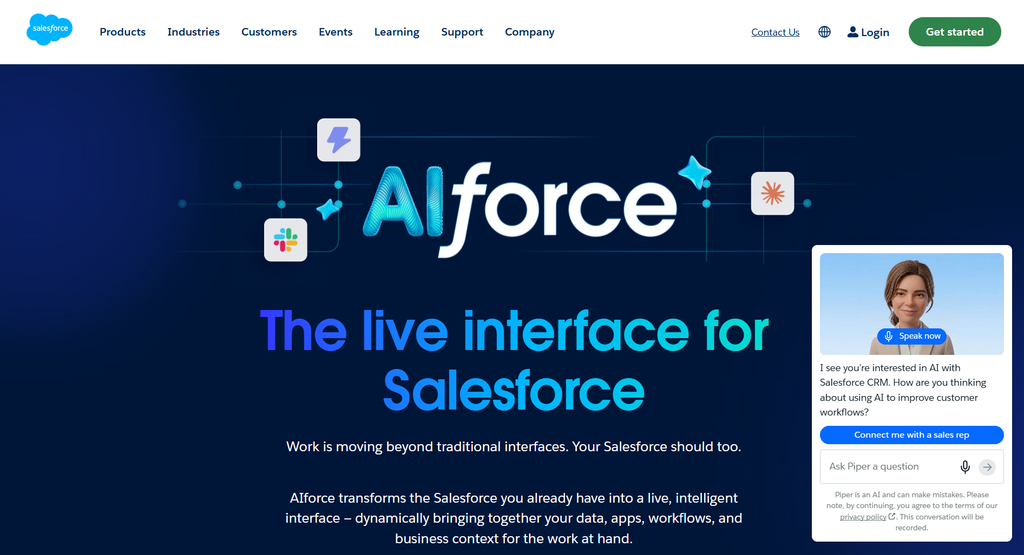
Today, Einstein capabilities are available across different Salesforce products and workflows, including sales, service, marketing, and the Salesforce platform. Salesforce also offers Agentforce, its platform for building and deploying AI agents, alongside its broader AI capabilities.
You can explore the official platform at Salesforce.
One of Einstein’s main advantages is that it can work with information already stored in a company’s CRM. Instead of manually analyzing every lead, customer interaction, or sales opportunity, teams can use supported AI features to identify patterns and surface useful information.
For example, a sales representative managing hundreds of potential customers might use Einstein-powered scoring to prioritize promising leads. A customer support agent could use AI-generated summaries to understand a customer’s previous interactions before responding to a new request.
Depending on the product and configuration, Salesforce Einstein can help businesses with:
- Predictive analytics and lead scoring
- Sales forecasting and opportunity insights
- AI-generated emails and summaries
- Customer service assistance
- Marketing personalization
- Conversation intelligence
- Automated workflows
- AI agents and business process assistance
It is important to understand that Salesforce Einstein is not one single application with one universal subscription price. It is a collection of AI technologies and capabilities that are packaged differently across Salesforce products and editions.
Some features may be included with eligible subscriptions, while others require additional licenses, usage credits, or specific configurations.
How We Evaluated Salesforce Einstein
This review examines Salesforce Einstein’s publicly documented features, intended applications, pricing considerations, and potential limitations. It does not claim that every feature has been independently tested under controlled conditions.
We considered the following factors:
- Availability of AI features
- Predictive analytics capabilities
- Lead and opportunity management
- Generative AI assistance
- Customer service automation
- Marketing applications
- Integration with Salesforce CRM
- Ease of implementation
- Pricing and additional usage costs
- Data quality requirements
- Security and governance considerations
- Suitability for small businesses and enterprises
We also considered how Einstein fits into everyday business activities, including sales prospecting, customer support, marketing campaigns, and workflow management.
The goal is to help readers decide whether Salesforce Einstein is suitable for their organization and whether its capabilities justify the investment.
Salesforce Einstein Features
1. Predictive Lead Scoring
Predictive lead scoring is one of Salesforce Einstein’s important sales intelligence capabilities.
Businesses often collect information about potential customers through websites, advertisements, email campaigns, events, and other marketing channels. However, not every lead has the same likelihood of becoming a paying customer.
Manually reviewing hundreds or thousands of leads can take considerable time. Einstein-powered lead scoring helps sales teams identify which prospects deserve more attention.
Depending on the eligible product and configuration, the system can analyze historical CRM data and relevant customer information to estimate the likelihood that a lead will convert.
For example, a software company might receive 1,000 leads in a month. Its sales representatives may not have enough time to contact every prospect immediately.
An AI-powered scoring system can help identify leads that resemble previously successful customers, allowing the sales team to prioritize its outreach.
Potential benefits include:
- Better lead prioritization
- Less time spent reviewing prospects manually
- More organized sales activities
- Improved visibility into lead quality
- More efficient use of sales resources
However, lead scoring is not a guarantee of future sales. Its usefulness depends on the available data, the selected model, and the relevance of historical patterns to current customers.
Companies with incomplete or inconsistent CRM records may receive less useful predictions.
2. Opportunity Scoring and Sales Predictions
Lead scoring helps businesses evaluate potential customers, while opportunity scoring focuses on existing sales opportunities.
Sales teams often manage several deals simultaneously. Some opportunities are progressing well, while others may be delayed because of pricing concerns, weak engagement, competition, or other problems.
Einstein-powered opportunity scoring can help sales representatives identify deals that may be more likely to close and highlight opportunities that require additional attention.
Depending on the available features, users may see scores and insights associated with individual opportunities.
For example, a sales manager could review a pipeline containing 50 active deals. Instead of treating every opportunity equally, the manager can use AI-generated insights to identify which deals deserve closer inspection.
This can help teams:
- Prioritize important opportunities
- Identify potential sales risks
- Focus follow-up activities
- Improve pipeline visibility
- Support more informed sales decisions
Salesforce also provides sales AI capabilities that summarize records and help users understand deal information.
Nevertheless, opportunity scores should support human judgment rather than replace it. A high score does not guarantee a successful sale, and a low score does not necessarily mean an opportunity should be abandoned.
3. AI-Powered Sales Forecasting
Sales forecasting is essential for businesses that need to plan revenue, staffing, budgets, and future growth.
Traditional forecasting often relies on sales representatives entering estimates into CRM systems. Although this approach can be useful, forecasts may become unreliable when updates are delayed or assumptions are overly optimistic.
Salesforce Einstein includes AI-powered forecasting capabilities for eligible products and configurations.
These capabilities can use relevant sales data and historical patterns to help businesses estimate future outcomes.
For example, a company planning its next quarter’s revenue could use forecasting tools to understand its pipeline and identify potential gaps between expected sales and business targets.
AI-supported forecasting can help with:
- Revenue planning
- Pipeline analysis
- Sales performance monitoring
- Identifying potential shortfalls
- Comparing predictions with business targets
The quality of a forecast still depends on the information available to the system. Changes in market conditions, customer budgets, competition, and sales strategies can affect actual results.
Businesses should regularly compare predictions with real outcomes and adjust their processes when necessary.
4. Generative AI and Content Creation
Sales and customer service teams spend considerable time writing emails, summarizing conversations, preparing responses, and documenting customer interactions.
Generative AI can help reduce some of this repetitive work.
Salesforce offers AI-powered content generation and assistance within eligible CRM workflows. Depending on the product and subscription, these capabilities can help users draft emails, summarize records, prepare customer communications, and create other business content.
For example, a sales representative preparing to contact a potential customer might use AI assistance to draft a follow-up email based on relevant CRM information.
A customer service representative could use an AI-generated summary to understand a customer’s issue before responding.
Potential benefits include:
- Faster email drafting
- More efficient record summaries
- Reduced repetitive writing
- Better preparation for customer conversations
- More consistent communication workflows
However, generated content is not always accurate or appropriate. AI may misunderstand context, omit important details, or produce wording that does not match the company’s communication standards.
Users should review AI-generated messages before sending them, especially when they contain pricing information, contractual commitments, sensitive customer details, or technical claims.
Generative AI is most useful when it reduces routine work without removing necessary human review.
5. Einstein Copilot and AI Assistance
Salesforce has used the name Einstein Copilot for its conversational AI assistant capabilities. Salesforce’s AI product landscape has since expanded to include Agentforce and other AI-powered experiences.
For that reason, businesses should check current Salesforce documentation rather than assume every feature previously associated with Einstein Copilot is available under the same name or subscription.
Conversational AI assistance can help users interact with business information using natural-language requests rather than navigating every record or report manually.
Depending on the available product and configuration, AI assistance may help users:
- Summarize customer records
- Understand account activity
- Draft communications
- Find relevant information
- Prepare for customer meetings
- Carry out supported CRM actions
For example, a sales representative might want a summary of a customer account before an important meeting. Instead of manually reviewing every interaction, the representative could use an available AI assistant to prepare a concise overview.
This can make CRM workflows more convenient, particularly for teams that manage large amounts of information.
However, conversational assistance is only as useful as its access to relevant data and its ability to interpret the request correctly.
Companies must also configure permissions carefully so that AI features operate within appropriate access controls.
6. Customer Service Automation
Customer service teams frequently deal with repeated questions, requests for account information, product inquiries, troubleshooting, and case management.
Salesforce provides AI capabilities within its service products to help agents work more efficiently and support customer interactions.
Depending on the product, these features may include AI-generated responses, case summaries, knowledge assistance, suggested actions, and automation through supported workflows or AI agents.
For example, an online retailer might receive many questions about delivery status, returns, refunds, and product availability.
AI-powered service tools can help representatives understand incoming requests, retrieve relevant information, and prepare responses. Properly configured AI agents may also handle certain supported tasks.
Potential advantages include:
- Faster access to customer information
- Reduced repetitive administrative work
- More consistent support processes
- Improved case documentation
- Assistance with common customer questions
The level of automation depends on the specific Salesforce service product, connected data, configured actions, and permissions.
AI should not be assumed to resolve every customer issue independently. Complex complaints, sensitive situations, exceptions, and decisions requiring special authorization may still need a human representative.
Businesses should also test AI-generated answers to ensure that they follow company policies and provide accurate information.
7. AI-Powered Marketing Personalization
Marketing teams need to understand customer interests, campaign performance, engagement patterns, and purchasing behavior.
Salesforce’s AI capabilities can support marketing activities by helping teams analyze customer information and personalize selected experiences.
Available features vary across Salesforce Marketing Cloud products and editions. Depending on the subscription, AI-powered marketing tools may assist with content generation, customer segmentation, send-time optimization, campaign insights, and other marketing workflows.
For example, an online business might communicate with customers through email campaigns. AI-powered capabilities could help the marketing team identify useful audience segments or optimize selected parts of its campaign process.
Possible applications include:
- Personalized marketing messages
- Campaign performance insights
- Customer engagement analysis
- Email content assistance
- Send-time optimization
- Audience targeting support
Personalization can make marketing communications more relevant when it is based on accurate, appropriately collected customer information.
However, marketing AI does not automatically guarantee higher conversions or better campaign performance. Results depend on the quality of the campaign, the audience, the offer, and the underlying data.
Businesses should also follow applicable privacy, consent, and marketing communication requirements.
8. Conversation Intelligence
Sales conversations contain valuable information about customer expectations, objections, competitor mentions, pricing concerns, and purchasing decisions.
Salesforce offers conversation intelligence capabilities through its sales products and related integrations.
Depending on the configuration, these tools can help teams analyze recorded sales conversations, identify important discussion points, summarize calls, and surface information that may help sales representatives improve their follow-up activities.
For example, a manager overseeing a sales team might want to understand why several deals are being delayed.
Conversation intelligence tools could help identify recurring topics, such as pricing concerns or missing product features, without requiring the manager to listen manually to every recorded call.
Potential benefits include:
- Faster access to call summaries
- Better visibility into customer objections
- More structured sales coaching
- Improved follow-up preparation
- Easier review of important conversations
These capabilities can be valuable for businesses with large sales teams and many customer interactions.
However, availability may depend on the Salesforce edition, add-on licenses, supported integrations, and recording setup.
Organizations should obtain appropriate consent where required and establish clear policies for recording, storing, and analyzing customer conversations.
Also Read: Adobe Firefly Review 2026: Features, Pricing, Pros, Cons & Alternatives
9. Workflow Automation and AI Agents
Salesforce has long provided workflow automation capabilities, and its AI platform can add intelligence to selected business processes.
Einstein-powered features can support automated tasks, while Salesforce’s broader Agentforce platform allows organizations to build and configure AI agents for supported business workflows.
Depending on the implementation, these systems may assist with activities such as retrieving information, preparing summaries, routing requests, updating records, or initiating approved actions.
For example, a business might configure a service workflow to classify incoming requests and direct them to the appropriate team.
Another organization could build an AI agent that answers approved customer questions using its knowledge resources and transfers more complicated requests to a human employee.
Possible benefits include:
- Reduced repetitive work
- More consistent business processes
- Faster handling of supported requests
- Better coordination between CRM activities
- Opportunities to scale selected workflows
Nevertheless, advanced automation requires careful planning. Businesses need to define which actions an AI agent may perform, what information it can access, when human approval is required, and how errors will be handled.
Organizations should begin with clearly defined, low-risk tasks before expanding AI agents into more complicated processes.
10. Data Integration and Security Controls
AI features need relevant information to produce useful results. Salesforce Einstein benefits from its integration with the Salesforce platform and the customer data available through eligible products and connected systems.
Depending on the implementation, organizations can configure data access, business rules, integrations, and permissions to support their AI workflows.
Salesforce also provides security and governance capabilities associated with its AI platform, including the Einstein Trust Layer for supported generative AI experiences.
These capabilities are intended to help organizations manage aspects of data protection, AI interactions, and the use of generative AI within Salesforce.
For businesses, important considerations include:
- Access permissions
- Customer data quality
- Data retention requirements
- Integration configuration
- AI output evaluation
- Audit and governance processes
- Applicable privacy regulations
However, having enterprise security features does not eliminate every risk.
Organizations remain responsible for configuring their systems appropriately, reviewing vendor terms, protecting sensitive information, and testing AI workflows before deployment.
The actual protections and controls available can vary by Salesforce product, configuration, and subscription.
Quick Summary
| Feature | Best For |
|---|---|
| Predictive Lead Scoring | Prioritizing sales prospects |
| Opportunity Scoring | Evaluating potential deals |
| Sales Forecasting | Revenue and pipeline planning |
| Generative AI | Drafting emails and summaries |
| Conversational AI Assistance | Finding and understanding CRM information |
| Customer Service AI | Supporting customer support workflows |
| Marketing AI | Personalizing campaigns and analyzing engagement |
| Conversation Intelligence | Reviewing sales calls and customer objections |
| Workflow Automation | Reducing repetitive business tasks |
| AI Agents | Automating supported multi-step workflows |
| Data and Security Controls | Managing enterprise AI implementation |
Salesforce Einstein Pricing
Salesforce Einstein does not have one universal price because its AI capabilities are distributed across different Salesforce products, editions, and add-ons.
The total cost depends on which CRM product a business uses, how many users need access, which AI features are required, and whether additional usage-based charges apply.
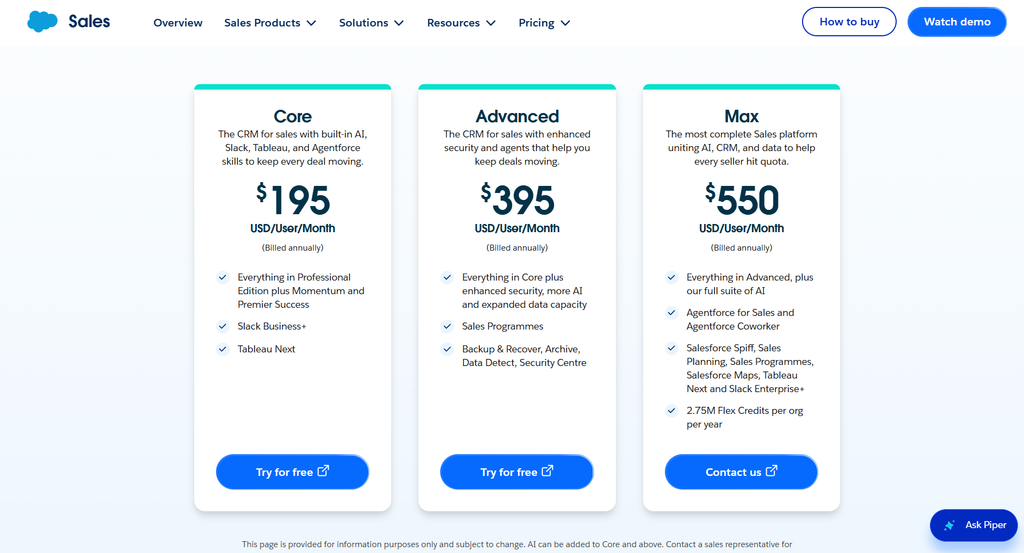
Salesforce’s official Sales Cloud pricing page provides an example of how prices vary between subscription tiers.
The following figures are examples of published Sales Cloud pricing, not standalone Einstein subscription prices.
Salesforce Sales Cloud Pricing Examples
| Plan | Published Price | Best For |
|---|---|---|
| Starter Suite | $25/user/month | Small businesses starting with CRM |
| Pro Suite | $100/user/month | Businesses needing more customization |
| Enterprise | $195/user/month | Organizations needing advanced CRM capabilities |
| Unlimited | $395/user/month | Businesses requiring broader CRM and AI capabilities |
| Agentforce 1 Sales | $550/user/month | Organizations seeking an extensive AI and CRM package |
Prices are in USD. These are published Sales Cloud package examples, generally billed annually where specified on the pricing page. They should not be interpreted as a complete price list for every Salesforce Einstein feature. Confirm current rates, billing terms, regional availability, and included capabilities with Salesforce before purchasing.
Official pricing reference: Salesforce Sales Cloud AI and pricing.
What About Einstein Add-Ons?
Some Einstein capabilities are available as part of eligible Salesforce editions, while others require additional licenses or add-ons.
For example, Salesforce documentation identifies Sales Cloud Einstein as available with Performance and Unlimited editions and as an additional-cost option for Enterprise Edition.
Other capabilities, such as certain AI assistants, conversation intelligence tools, and platform-level AI features, have their own licensing and eligibility requirements.
Generative AI usage can also involve Einstein Requests or Data Cloud credits, depending on the product and feature being used.
This means businesses should evaluate more than the advertised per-user subscription price.
Before purchasing, ask Salesforce to clarify:
- Which Einstein features are included in the selected edition?
- Are additional AI licenses required?
- Are usage credits included?
- What happens if the included usage allowance is exceeded?
- Are implementation or consulting services needed?
- Do all employees require paid licenses?
- Are integrations or additional Salesforce products necessary?
Is Salesforce Einstein Worth the Price?
Salesforce Einstein can offer good value to organizations that already depend on Salesforce and have substantial sales, service, or marketing workloads.
For example, a business with a large sales team might save time by automating selected administrative tasks, summarizing customer information, and prioritizing sales opportunities.
However, the financial benefit depends on actual results rather than the number of AI features available.
A small company with only a few customers and simple sales processes might not need advanced enterprise AI capabilities.
Similarly, businesses that do not use Salesforce may need to consider the cost of adopting the CRM platform before they can benefit from Einstein.
A practical approach is to identify one or two repetitive business processes, test suitable AI features, and measure the results before expanding the implementation.
Also Read: Midjourney Review 2026: Features, Pricing, Pros, Cons & Alternatives
Salesforce Einstein Pros and Cons
| Pros ✅ | Cons ❌ |
|---|---|
| AI-powered CRM: Integrates AI into Salesforce workflows. | Can be expensive: Additional licenses and usage credits may increase costs. |
| Predictive analytics: Helps prioritize leads and evaluate sales opportunities. | Complex pricing: Features and costs vary by subscription and product. |
| Sales forecasting: Supports revenue planning and pipeline analysis. | Requires quality data: Poor or incomplete CRM data can reduce accuracy. |
| Generative AI: Helps draft emails, summarize records, and create content. | Learning curve: Users may need training to use features effectively. |
| Customer service automation: Supports responses, case summaries, and service workflows. | Feature limitations: Not every AI feature is included in every plan. |
| Workflow automation: Reduces repetitive administrative tasks. | Implementation effort: Advanced setups may require technical expertise. |
| Customization: Supports business-specific workflows and configurations. | Human review needed: AI-generated content and predictions can be inaccurate. |
| Enterprise controls: Offers security and governance features for supported AI experiences. | Salesforce dependency: Best suited to businesses already using or planning to use Salesforce. |
Who Should Use Salesforce Einstein?
Salesforce Einstein is best suited to organizations that want to incorporate AI into existing CRM workflows rather than use a separate AI tool for a single isolated task.
1. Sales Teams
Sales teams can use supported Einstein capabilities to prioritize leads, review opportunities, prepare customer communications, and analyze pipeline activity.
It is particularly relevant to organizations with large numbers of leads and active deals.
2. Customer Service Departments
Customer service teams may benefit from AI-generated summaries, response assistance, knowledge retrieval, and selected automated workflows.
Businesses with high volumes of repetitive support requests may find these capabilities especially useful.
3. Marketing Teams
Marketing departments can explore available AI capabilities for campaign insights, personalization, content generation, and customer engagement.
The right feature set depends on the Salesforce marketing product in use.
4. Medium-Sized Businesses
Growing companies may find Einstein valuable when their customer relationships, sales activities, and reporting requirements become too complicated to manage manually.
However, the business should evaluate licensing costs and implementation requirements before committing.
5. Large Enterprises
Large organizations often have more complex workflows, larger datasets, and multiple teams that need consistent access to customer information.
Einstein’s integration with Salesforce can help support these environments, provided the organization invests in suitable configuration, data management, training, and governance.
Who Might Want to Avoid It?
Salesforce Einstein may be less suitable for:
- Individuals looking for a simple standalone chatbot
- Freelancers who only need occasional AI writing assistance
- Small businesses with very limited CRM requirements
- Organizations unwilling to invest in implementation and training
- Businesses that do not want to adopt the Salesforce ecosystem
These users may find a smaller, more focused AI application easier and less expensive to manage.
Salesforce Einstein Use Cases
1. Lead Generation and Sales Prospecting
Sales teams can use AI-powered scoring and insights to organize prospects and focus on leads that deserve additional attention.
A company receiving leads from several marketing channels may use its CRM data to support prioritization and follow-up planning.
The goal is to help representatives spend less time sorting through records and more time engaging with relevant prospects.
2. Customer Relationship Management
Businesses can use AI-powered summaries and CRM assistance to prepare for meetings, understand account histories, and review previous customer interactions.
This can be particularly useful for account managers responsible for maintaining relationships with many customers.
3. Email and Communication Workflows
Sales representatives and service agents can use supported generative AI capabilities to prepare email drafts, summarize interactions, and organize follow-up activities.
Human review remains important to ensure that messages are accurate and appropriate.
4. Customer Support
Organizations can use AI assistance and configured automation to support customer service processes.
For example, a service department might use AI to summarize a case, retrieve relevant knowledge, or help route a request to the right team.
More advanced agent-based workflows can handle selected tasks when they are configured and authorized appropriately.
5. Sales Forecasting and Business Planning
Managers can use AI-powered forecasting and pipeline insights to support planning decisions.
These tools can help identify potential gaps between current opportunities and revenue targets, but forecasts should be reviewed alongside business conditions and real sales performance.
6. Marketing Campaigns
Marketing teams can use supported AI features to help personalize selected customer interactions, analyze campaign information, and streamline content creation.
Campaign performance should still be measured using appropriate business metrics rather than assuming that AI automatically improves conversions.
7. Business Process Automation
Companies can combine Salesforce automation with AI assistance or AI agents to reduce repetitive tasks.
A useful starting point is a process with clear rules, predictable inputs, and measurable outcomes.
For more complex processes, businesses should introduce approval requirements and escalation procedures before allowing AI to take consequential actions.
Also Read: Pictory Review 2026: Features, Pricing, Pros, Cons & Alternatives
Salesforce Einstein Alternatives
Salesforce Einstein is not the only option for businesses interested in AI-powered productivity, CRM automation, or customer service.
The best alternative depends on whether the organization needs a complete CRM platform, AI assistance for an existing system, marketing automation, or a standalone AI assistant.
| Alternative | Best For | Main Difference |
|---|---|---|
| HubSpot | CRM, sales, and marketing | CRM and marketing tools with integrated AI capabilities |
| Microsoft Dynamics 365 | Enterprise CRM and business applications | CRM and business workflows within Microsoft’s ecosystem |
| Zoho CRM | Small and growing businesses | CRM features and AI assistance within Zoho |
| Freshworks | Customer service and sales workflows | Customer support and sales software with AI capabilities |
| ChatGPT | General-purpose AI assistance | Writing, analysis, brainstorming, and information tasks rather than a full CRM platform |
Pricing and included AI features vary by product and subscription. Check each provider’s official website before making a purchase.
1. HubSpot
HubSpot is a CRM platform with sales, marketing, customer service, and AI-powered capabilities.
It can be a useful alternative for businesses seeking customer management and marketing tools within a unified interface.
Compared with Salesforce Einstein, HubSpot may appeal to organizations that want a more approachable starting point for CRM and marketing activities.
However, businesses with complicated enterprise requirements should compare customization, integrations, reporting, permissions, and total cost before choosing either platform.
2. Microsoft Dynamics 365
Microsoft Dynamics 365 combines CRM and business applications, with AI capabilities available through relevant Microsoft products and services.
It may be a good fit for organizations that already use Microsoft business software and want their CRM workflows to work alongside those systems.
Salesforce Einstein may be preferable for companies already established in Salesforce, while Dynamics 365 deserves consideration for organizations that prefer Microsoft’s ecosystem.
The final choice depends on the applications, licensing, integrations, and business processes involved.
3. Zoho CRM
Zoho CRM provides customer relationship management tools and AI-related capabilities through its product ecosystem.
It may suit small and medium-sized businesses looking for a CRM platform to organize contacts, manage sales pipelines, and automate selected activities.
Zoho CRM is worth comparing with Salesforce when affordability, ease of adoption, and the requirements of a smaller team are important considerations.
However, exact pricing and available AI features depend on the selected plan.
4. Freshworks
Freshworks offers customer service and sales software with AI capabilities across relevant products.
It can be an alternative for businesses whose main priorities are customer support, service workflows, and sales productivity rather than a broad Salesforce implementation.
Organizations should compare the specific Freshworks product with the Salesforce products they actually need, rather than treating every feature as a direct equivalent.
5. ChatGPT
ChatGPT is a general-purpose AI assistant that can help with writing, summarization, brainstorming, analysis, and many other tasks.
It may be more appropriate for individuals, freelancers, or small businesses that primarily need help producing content or working with information.
However, ChatGPT is not a direct replacement for a full CRM platform. Salesforce Einstein’s main advantage is its integration with supported Salesforce business workflows, customer records, and automation capabilities.
The right choice depends on whether you need general-purpose AI assistance or AI embedded in your customer management system.
Salesforce Einstein Review Conclusion
Salesforce Einstein is a powerful collection of AI capabilities for organizations that want to make their CRM workflows more intelligent and efficient.
Its strongest advantages include predictive sales insights, lead and opportunity scoring, AI-assisted content generation, customer service support, and integration with the Salesforce ecosystem.
For businesses that already use Salesforce extensively, these capabilities can help reduce repetitive work, improve access to customer information, and support better-informed decisions.
However, Einstein is not a universal solution for every AI task. Its costs and complexity can be significant, and its usefulness depends on data quality, feature availability, configuration, and employee adoption.
Small businesses should carefully evaluate whether they need Salesforce’s broader CRM platform before investing in advanced AI capabilities. Companies with simple requirements may find a more focused or affordable alternative sufficient.
Our final verdict: Salesforce Einstein is worth considering for established sales, service, and marketing teams that want AI integrated into their CRM workflows. It is less compelling for users who only need a standalone chatbot or occasional AI writing assistance.
Before purchasing, identify your most important business problems, verify which Einstein features are included in your Salesforce edition, and test the capabilities against measurable goals.
That approach will help you determine whether the platform offers practical value for your organization.
Frequently Asked Questions
What is Salesforce Einstein used for?
Salesforce Einstein is used to bring AI-powered predictions, content generation, insights, and automation into Salesforce products. Its applications include sales forecasting, lead scoring, customer service assistance, marketing workflows, and supported AI-agent tasks.
Is Salesforce Einstein free?
There is no single free Einstein subscription covering every feature. Some AI capabilities may be included with eligible Salesforce editions, while others require additional licenses, add-ons, or usage credits. Check the relevant product’s pricing and eligibility requirements.
How much does Salesforce Einstein cost in 2026?
Salesforce Einstein pricing depends on the product, edition, features, and usage requirements. For example, Salesforce publishes Sales Cloud package prices ranging from $25 per user per month for Starter Suite to higher-priced enterprise packages. These are CRM package prices, not universal Einstein prices. Confirm the current cost with Salesforce.
Is Salesforce Einstein good for small businesses?
It can be useful for small businesses that already use Salesforce and have clear needs for AI-assisted sales or customer service. However, the platform may be unnecessarily complex or expensive for businesses with simple customer management requirements.
Does Salesforce Einstein use generative AI?
Yes. Salesforce offers generative AI capabilities across eligible products, including features that can help draft content, summarize records, and support business workflows. Availability depends on the product, configuration, and subscription.
What is the difference between Salesforce Einstein and Agentforce?
Einstein refers to Salesforce’s broader AI technology and capabilities, including predictive and generative AI. Agentforce is Salesforce’s platform for building and deploying AI agents that can assist with or carry out supported tasks. The products are related, but they are not interchangeable names for one identical feature.
Can Salesforce Einstein automate sales tasks?
Yes. Depending on the selected product and configuration, Einstein-powered capabilities can assist with lead prioritization, summaries, email drafting, sales insights, and other activities. Additional workflow automation or Agentforce configuration may be required for more advanced tasks.
Does Salesforce Einstein require coding?
Not every Einstein feature requires coding. Many capabilities can be configured through Salesforce’s user interface and supported administrative tools. However, advanced customization, integrations, data preparation, and complex automation may require a Salesforce administrator or developer.
Is Salesforce Einstein better than ChatGPT?
Neither is universally better. Salesforce Einstein is designed to provide AI capabilities within Salesforce business workflows, while ChatGPT is a general-purpose AI assistant. Salesforce is more relevant for CRM-integrated sales and service processes; ChatGPT may be more suitable for general writing, research assistance, and brainstorming.
What are the best alternatives to Salesforce Einstein?
Potential alternatives include HubSpot, Microsoft Dynamics 365, Zoho CRM, Freshworks, and ChatGPT. The best choice depends on whether you need a full CRM, customer service automation, marketing tools, or general-purpose AI assistance.
Does Salesforce Einstein guarantee accurate predictions?
No. AI predictions are estimates based on available information and the capabilities of the underlying models. Businesses should validate results, monitor performance, and combine AI-generated insights with human judgment.
Is Salesforce Einstein worth it in 2026?
Salesforce Einstein may be worth the investment for organizations that already rely on Salesforce and can benefit from AI-powered insights and automation. Businesses should compare the total cost with measurable improvements in productivity, customer service, and sales performance before committing.
Final recommendation: If your organization already uses Salesforce, start by identifying which Einstein features are included in your current subscription. Test the most relevant capabilities, measure their impact, and expand only when the results justify the additional cost.
For official information, visit Salesforce AI and Salesforce Sales Cloud AI.