

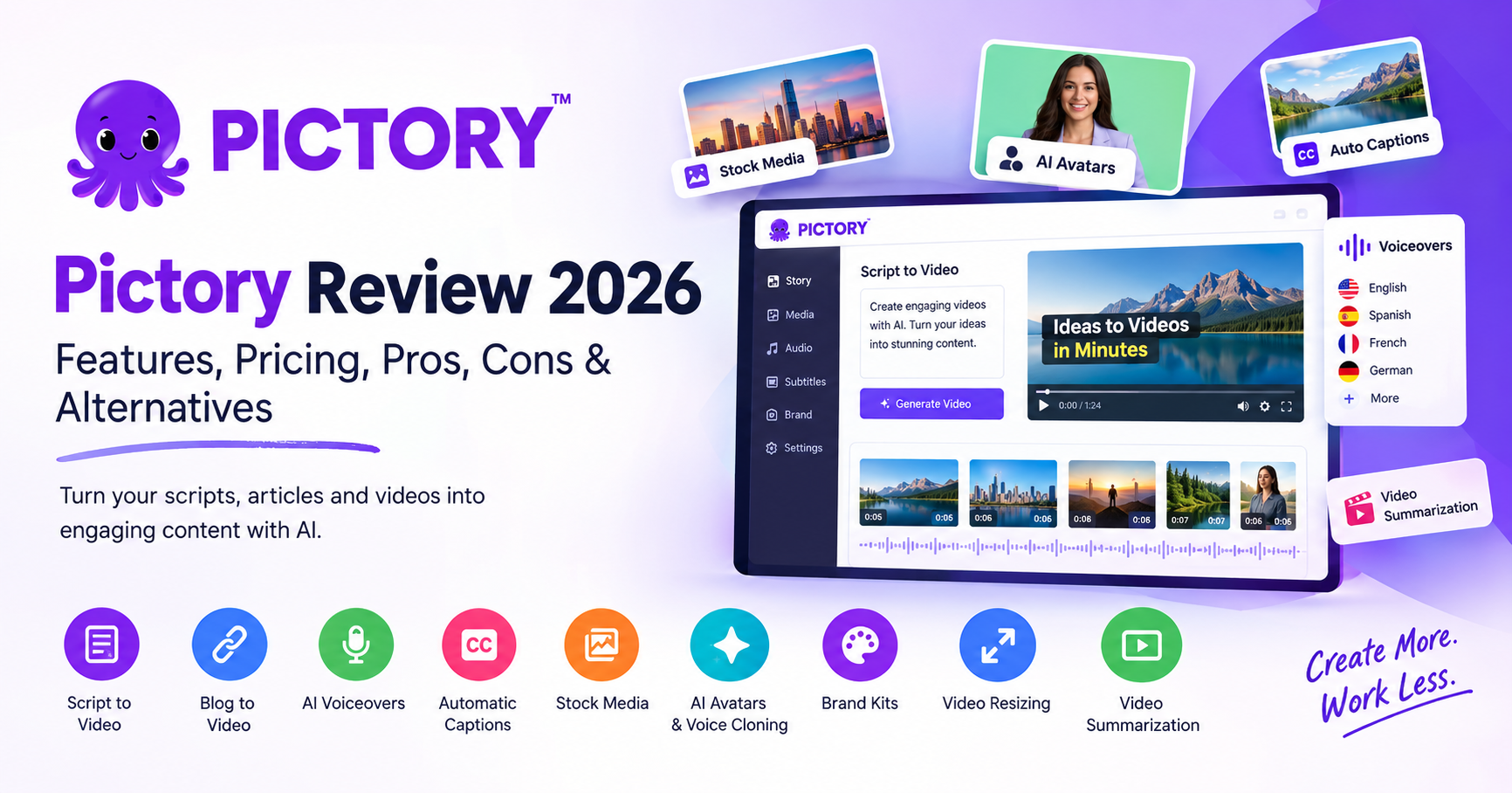
Pictory Review
Pictory AI is an AI-powered video creation platform that helps users transform written content, scripts, blog posts, and existing videos into engaging video content. It is designed for content creators, marketers, bloggers, YouTubers, educators, businesses, and social media professionals who want to produce videos without spending hours learning complicated editing software.
Unlike traditional video editors that require users to manually arrange footage, edit timelines, add captions, and record voiceovers, Pictory automates many of these tasks. Users can start with a script or article, generate a video using relevant visuals, add AI narration, and customize the final result through a browser-based editor.
Pictory has expanded its capabilities to include AI voiceovers, automatic subtitles, video summarization, stock media, brand customization, AI avatars, and tools for repurposing existing content. These features make it useful for people who want to turn one piece of content into multiple video formats.
However, Pictory is not a complete replacement for professional video editing software. Its automated visuals may not always match the intended meaning, and users who need advanced animation, precise visual effects, or detailed timeline control may find its editing capabilities limited.
So, what exactly does Pictory offer, how much does it cost, and is it worth using in 2026?
Let’s take a closer look.
Table of Contents
Our Rating
| Category | Our Rating |
|---|---|
| Ease of Use | 9/10 |
| AI Video Creation | 8.5/10 |
| AI Voiceovers | 8.5/10 |
| Video Editing | 8/10 |
| Features | 8.5/10 |
| Pricing | 8/10 |
| Content Repurposing | 9/10 |
| Overall | 8.5/10 |
Editorial assessment based on Pictory’s advertised capabilities, intended use cases, and pricing structure. Ratings are not results of an independent hands-on benchmark.
About Pictory
Pictory is an AI video creation platform designed to make video production accessible to people without professional editing experience. It uses artificial intelligence to help transform text, scripts, articles, and existing video recordings into polished, shareable content.
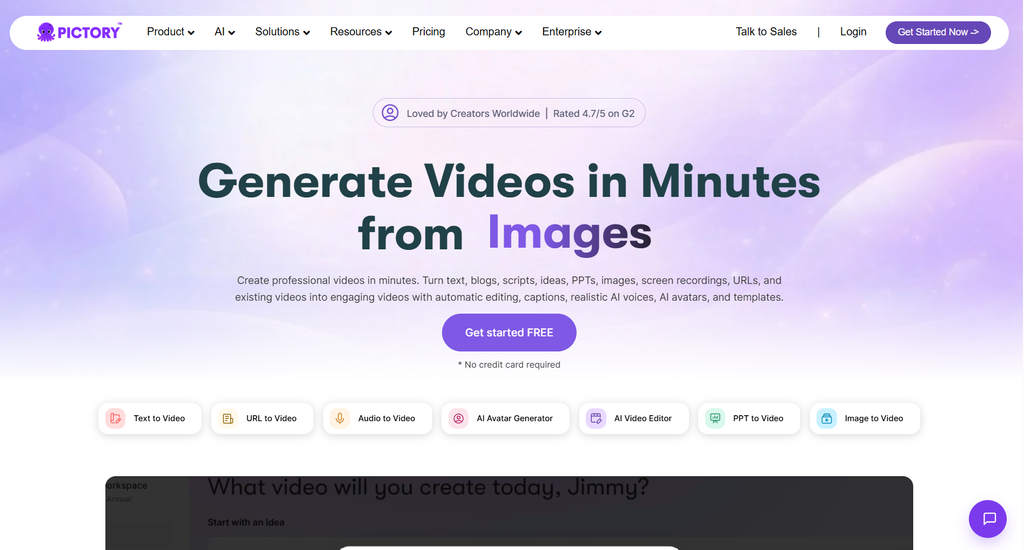
The platform is particularly useful for content repurposing. For example, a blogger can turn a written article into a narrated video, while a YouTube creator can extract shorter highlights from a longer recording. Marketing teams can also use Pictory to create promotional videos, product explainers, and social media content.
Pictory combines several tools in one online workspace, including:
- Script-to-video generation
- Blog-to-video conversion
- AI voiceovers
- Automatic subtitles and captions
- Stock footage and images
- Video summarization
- Text-based video editing
- AI avatars and voice cloning on eligible plans
- Brand kits and customization
- Video resizing for different platforms
One of Pictory’s main advantages is its straightforward workflow. Instead of starting with a blank editing timeline, users can provide their content and let the platform create an initial video structure.
The generated video can then be reviewed and customized before export.
Pictory is aimed primarily at users who need to create informational, educational, promotional, and social media videos efficiently. It is less focused on cinematic production or highly complex video editing.
How We Evaluated Pictory
This review examines Pictory’s publicly listed features, subscription options, intended workflows, and potential limitations. It is not a claim that every feature has been independently tested under controlled conditions.
We considered the following factors:
- Ease of getting started
- Script-to-video workflow
- Article-to-video conversion
- AI voice quality and language options
- Automatic captions and subtitles
- Stock footage and image selection
- Editing flexibility
- Video summarization
- Branding and customization
- Export resolution and usage limits
- Subscription pricing
- Suitability for businesses and creators
- Potential limitations
We also considered how Pictory fits into common content workflows, including blog promotion, YouTube production, social media marketing, educational content, and business communications.
The goal is to help readers understand what the platform offers and whether its features match their video creation needs.
Pictory Features
1. AI Script-to-Video Generation
Script-to-video generation is one of Pictory’s core features.
Users can provide a written script, and Pictory helps transform it into a structured video. The platform breaks the content into scenes and pairs the text with relevant stock footage, images, and other visual elements.
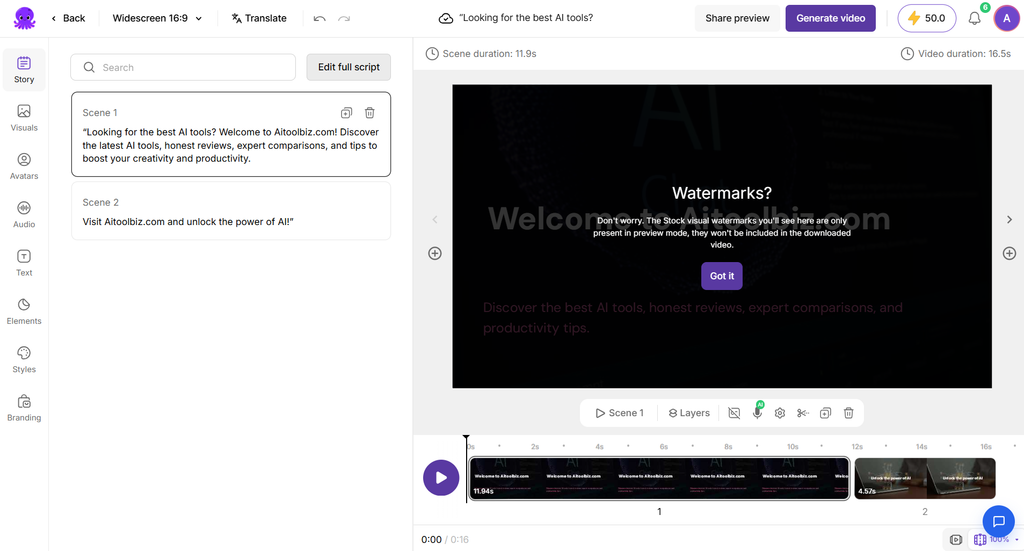
This is particularly useful for creators who already have a script but do not have the time or resources to film every scene themselves.
For example, a YouTube creator writing a video about artificial intelligence can paste the script into Pictory. The platform can then help assemble a sequence of scenes with supporting visuals and narration.
Users can review the generated scenes, change the media, adjust the text, and customize the overall presentation.
The main benefit is speed. Rather than building every scene manually, users start with an automated draft and refine it.
However, AI-generated scene selection is not always perfect. Some visuals may be too generic or only loosely related to the script. Reviewing the footage before publishing remains important.
2. Blog-to-Video Conversion
Pictory’s article-to-video feature is especially relevant for bloggers, publishers, and SEO professionals.
Users can provide a supported article URL, allowing Pictory to extract written content and convert it into a video presentation.
The platform can help identify key points, organize the content into scenes, and match those scenes with relevant visuals.
This workflow can help website owners repurpose existing articles instead of creating every video from scratch.
For example, a technology website publishing an article about AI writing tools could create a short video summarizing the article’s main points. The video could then be embedded in the original post or shared on social media.
This approach offers several potential benefits:
- Repurpose existing blog content
- Create video summaries of long articles
- Produce additional social media assets
- Reach audiences who prefer watching videos
- Support content distribution across multiple channels
There are some limitations. Pictory’s documentation specifies HTML-based blog and news articles for URL conversion, rather than every document format. A URL may also fail to import correctly if the page structure prevents the platform from extracting its content.
For best results, use a clean article URL and review the generated script before creating the final video.
3. AI Voiceovers
Pictory includes AI voiceover functionality that allows users to narrate videos without recording their own voice.
Users can select an available AI voice and apply it to their video. Depending on the subscription plan, Pictory also provides access to more advanced voices powered by ElevenLabs.
AI narration can be useful for explainer videos, tutorials, educational content, product presentations, and faceless YouTube channels.
It can also help businesses produce consistent narration across multiple videos without arranging recording sessions.
Pictory’s voice options vary by plan. Its pricing page lists standard AI voices and additional ElevenLabs voice allowances, with different language support and usage limits.
Although AI narration can save time, voice quality and pronunciation may vary. Names, technical terminology, abbreviations, and less common words may require manual correction or a different pronunciation approach.
Users should listen to the complete narration before publishing, especially when producing professional or educational content.
4. Automatic Subtitles and Captions
Captions are an important part of modern video content, particularly for social media platforms where many viewers watch without sound.
Pictory can automatically generate captions and synchronize them with video narration.
This helps creators make their content easier to follow and more accessible to viewers.
The platform also provides subtitle export options on eligible workflows, including formats such as SRT and VTT.
Automatic captions can be useful for:
- YouTube videos
- Instagram Reels
- TikTok videos
- Facebook video posts
- Online tutorials
- Training materials
- Marketing presentations
Captions should still be reviewed for spelling, punctuation, timing, and transcription accuracy. AI systems can misinterpret technical terms, names, and words that sound similar.
For creators publishing large volumes of video, automatic captioning can reduce repetitive editing work.
5. Stock Footage and Images
Pictory offers access to a library of stock videos and images that users can incorporate into their projects.
These assets help users create visually engaging videos without filming every scene themselves.
For example, a video about remote work might include footage of people using laptops, attending meetings, or working in an office. A video about travel could use relevant destination footage.
Pictory’s current pricing page lists access to Getty Images and Storyblocks on selected plans, with the available libraries depending on the subscription.
This can be valuable for marketers, bloggers, and businesses that regularly need supporting visuals.
However, stock footage can sometimes make videos feel generic. If several creators use similar templates and stock clips, their content may look alike.
Users can improve the final result by replacing unsuitable visuals, incorporating original footage, using branded assets, and choosing media that closely matches the message.
Always check the applicable licensing terms and any restrictions associated with the plan before using assets in commercial projects.
6. AI Video Summarization
Pictory offers tools for turning longer videos into shorter, more focused content.
This feature is particularly useful for webinars, interviews, presentations, podcasts, and educational recordings.
Instead of manually reviewing an entire recording to find useful moments, users can use AI-assisted tools to identify important sections and create shorter videos.
For example, a business hosting a 45-minute webinar could create several short clips covering the most important insights.
These clips could be published on social media, embedded in blog posts, or used in email marketing campaigns.
Video summarization can help businesses get more value from existing recordings.
However, automated summaries may omit context or select moments that do not work well when viewed independently. Users should check the selected clips, ensure the message remains accurate, and adjust the beginning and ending of each segment.
Pictory lists advanced video summarization among the features available with its Professional plan.
7. Text-Based Video Editing
Pictory provides an editing workflow that makes video changes less intimidating for beginners.
Rather than relying entirely on a traditional timeline, users can edit text and scenes to modify their videos.
Depending on the workflow, users can adjust the script, remove unwanted sections, replace footage, modify scene arrangements, and refine the presentation.
This approach is useful when the primary goal is to create a narrated video from written content.
For example, if a script contains an unnecessary paragraph, removing the corresponding text can help simplify the video without requiring extensive manual editing.
Text-based editing is particularly helpful for informational videos, tutorials, and content repurposing.
However, creators who need frame-by-frame precision, advanced compositing, complex transitions, or detailed audio mixing may still need a dedicated video editor.
Pictory focuses on making common editing tasks easier rather than replacing every professional editing function.
8. AI Avatars and Voice Cloning
Pictory has expanded beyond conventional stock-footage videos with AI avatar and voice-cloning capabilities.
Custom avatars can help businesses create presenter-style videos without filming a person for every update.
Voice cloning can also support consistent narration when users want to reproduce an approved voice across multiple pieces of content.
These features can be useful for internal training, product explainers, onboarding videos, and marketing presentations.
Availability and usage limits depend on the subscription plan and AI credit allowance.
Users should review the specific plan details before subscribing, particularly if avatar videos or cloned voices are central to their workflow.
Voice cloning should only be used with appropriate permission from the person whose voice is being replicated. Similarly, avatar-based content should be presented transparently when viewers could reasonably mistake a synthetic presenter for a real person.
These tools can improve production efficiency, but they do not eliminate the need for thoughtful scripts, accurate information, and appropriate disclosure.
9. Brand Kits and Customization
Pictory provides brand customization features that help users maintain a consistent visual identity.
Brand kits can store elements such as logos, brand colors, and other visual settings.
This is useful for companies, agencies, and creators who produce multiple videos under the same brand.
For example, a marketing team can use consistent colors and branding across product announcements, tutorials, and promotional videos.
The number of brand kits available depends on the plan. Pictory lists one brand kit for Starter, five for Professional, and ten for Team under its annual pricing options.
Brand customization can help make AI-generated videos look more professional and recognizable.
However, a brand kit alone does not guarantee a distinctive visual identity. Users should also pay attention to typography, scene selection, pacing, and the quality of the script.
10. Video Resizing and Export
Different platforms require different video formats and dimensions.
A landscape video may work well on YouTube, while vertical content is often more suitable for short-form mobile platforms.
Pictory provides tools to resize and optimize videos for different publishing destinations.
Its pricing information lists 1080p export on paid plans, while the free trial has more limited export specifications.
Users should confirm the exact resolution, aspect ratios, and export allowances included in their chosen plan.
Video export limits are particularly important for creators who publish frequently. Pictory measures usage through video minutes, and the available allowance depends on the subscription.
Planning exports around the intended platform can help reduce unnecessary editing and avoid using more of the monthly allowance than expected.
Quick Summary
| Feature | Best For |
|---|---|
| Script-to-Video | Turning written scripts into videos |
| Blog-to-Video | Repurposing articles |
| AI Voiceovers | Narrating videos without recording |
| Automatic Captions | Adding subtitles efficiently |
| Stock Media | Finding supporting visuals |
| Video Summarization | Creating shorter clips from long recordings |
| Text-Based Editing | Making simple video edits |
| AI Avatars | Presenter-style videos |
| Voice Cloning | Consistent narration |
| Brand Kits | Maintaining brand identity |
| Video Resizing | Preparing content for different platforms |
Pictory Pricing
Pictory offers several subscription plans for individual creators, professional video producers, teams, and larger businesses.
Its pricing page displays both monthly billing and discounted annual billing. The prices below are listed in US dollars and reflect the published plan options checked in September 2026.
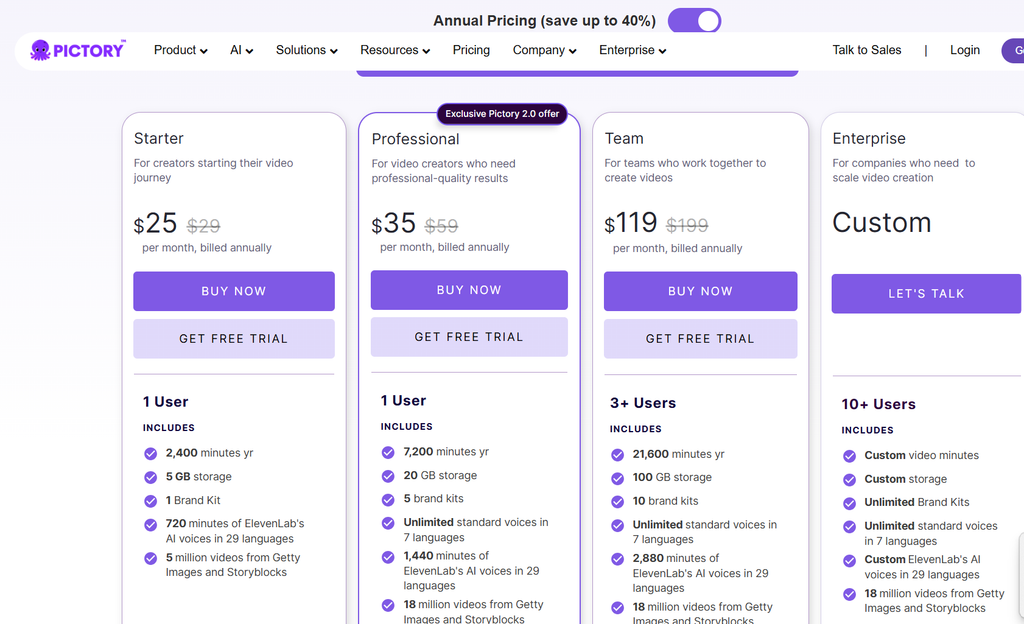
Pricing, promotional offers, included credits, and usage allowances can change. Check the official pricing page before purchasing.
Pictory Pricing Table
| Plan | Monthly Billing | Annual Billing (Monthly Equivalent) | Best For |
|---|---|---|---|
| Starter | $29/month | $25/month | Beginners and individual creators |
| Professional | $59/month | $35/month | Frequent video creators |
| Team | $199/month | $119/month | Teams and agencies |
| Enterprise | Custom | Custom | Larger organizations |
Annual prices are billed yearly. The monthly equivalent is not the same as paying month to month.
Last Updated: 30/09/2026
Starter Plan
The Starter plan is designed for individuals who are beginning their video creation journey.
It includes:
- 200 video minutes per month with monthly billing
- 5 GB of storage
- One brand kit
- Access to stock media
- AI voice options with plan-specific limits
- Basic AI tools
- No-watermark exports
- Automatic synchronization of uploaded voiceovers
The annual Starter option lists 2,400 video minutes per year and additional annual allowances.
This plan may suit bloggers, solo creators, and small businesses that need a manageable amount of video production.
However, users who publish frequently should pay attention to the export allowance and AI credit limits.
Professional Plan
The Professional plan is intended for creators who need more video capacity and advanced features.
Its listed benefits include:
- 600 video minutes per month with monthly billing
- 20 GB of storage
- Five brand kits
- Expanded AI voice allowances
- Access to advanced AI tools
- Custom avatars
- Voice cloning
- Video summarization
- A larger stock media selection
- 1080p video exports
The annual plan lists 7,200 video minutes per year, alongside annual AI credit and voice allowances.
Professional may be suitable for YouTubers, content marketers, publishers, and businesses that produce videos regularly.
The extra capacity and features can be useful for creators who have moved beyond occasional video production.
Team Plan
The Team plan is designed for businesses and groups that need collaboration features.
Its published benefits include:
- Three or more users
- 1,800 video minutes per month with monthly billing
- 100 GB of storage
- Ten brand kits
- Shared team workspace
- Expanded AI voice allowances
- Advanced video creation features
- Team collaboration tools
- Professional onboarding and training
The annual plan lists 21,600 video minutes per year.
This plan may be relevant to marketing agencies, production teams, and organizations managing video content across multiple brands.
Because usage and collaboration needs vary, teams should check how video minutes, storage, seats, and AI credits are allocated.
Enterprise Plan
Pictory also offers an Enterprise option for larger organizations.
Pricing is customized according to business requirements.
The listed Enterprise features include options such as custom usage allowances, expanded brand kits, single sign-on, dedicated support, custom templates, and additional services.
Enterprise customers may also have access to Pictory Central, an interactive video hosting solution with features such as clickable calls to action, quizzes, and learning management system-related functionality.
Organizations considering this plan should contact Pictory to confirm pricing, contract terms, security requirements, and the exact features included.
Is Pictory Worth the Price?
Pictory’s value depends on how frequently you create videos and how much time its automation saves.
For someone producing several videos every week, script conversion, stock footage, voiceovers, and automatic captions can reduce the amount of repetitive work involved.
For someone creating only one short video every few months, a recurring subscription may be harder to justify.
It is also important to consider the difference between video minutes and AI credits. These allowances are not interchangeable, and different features may consume different amounts of usage.
Before choosing a plan, estimate how many minutes of finished video you expect to export each month and identify whether you need advanced voices, avatars, or team collaboration.
Pros & Cons
| Pros | Cons |
|---|---|
| Easy-to-understand video creation workflow | Automated visuals may not always match the script |
| Converts scripts and articles into videos | Less control than advanced editing software |
| Useful for repurposing existing content | Stock footage can look generic |
| AI voiceovers reduce recording requirements | Voice pronunciation may need corrections |
| Automatic captions save editing time | Captions still require proofreading |
| Access to stock media | Media libraries vary by plan |
| Brand kits support consistent branding | Customization has plan-specific limits |
| Video summarization helps repurpose recordings | Automated clips may need manual refinement |
| AI avatars and voice cloning are available | Advanced features may require higher-tier plans |
| Browser-based workflow | Subscription and usage limits require planning |
Who Should Use Pictory?
Pictory is designed for people who want to produce videos efficiently without managing a complex editing workflow.
It can be useful for:
- Bloggers and website owners
- YouTube creators
- Social media managers
- Digital marketing professionals
- Content marketing agencies
- Small business owners
- Online educators
- Corporate training teams
- Podcast and webinar producers
- Freelance video creators
- Publishers and media organizations
It is particularly relevant for people who already have written content or recorded videos that can be repurposed.
However, Pictory may be less suitable for professional filmmakers, advanced motion designers, and editors who need detailed control over every frame, effect, transition, and audio track.
Users who need only occasional video creation may also prefer a free or lower-cost editing tool.
Pictory Use Cases
1. Blog and Website Content
Bloggers can turn existing articles into videos that summarize key information.
These videos can be embedded into relevant posts, shared through social media, or included in newsletters.
For publishers, this provides another way to distribute existing content without starting every project from scratch.
The most useful approach is to create a concise video that complements the article rather than simply reading every paragraph aloud.
2. YouTube Video Creation
YouTube creators can use Pictory to produce narrated videos, educational explainers, list-based content, and other formats that rely on scripts and supporting visuals.
The platform can help organize a script into scenes and add relevant footage, captions, and AI narration.
It may be especially useful for creators who publish regularly and do not want to appear on camera.
However, successful YouTube content still requires original ideas, good storytelling, appropriate pacing, and a clear understanding of the target audience.
Automated video creation alone does not guarantee views or audience retention.
3. Social Media Marketing
Social media teams often need multiple videos for different campaigns and platforms.
Pictory can help convert written campaign material into video content and prepare assets for different formats.
Businesses can create short promotional videos, educational clips, product announcements, and branded content.
The platform’s templates, stock footage, captions, and resizing features can help simplify production.
For stronger results, teams should adapt the message and pacing to the intended platform instead of publishing the same video everywhere without changes.
4. Educational Videos and Tutorials
Teachers, trainers, and educational creators can turn scripts and learning materials into narrated video lessons.
Pictory can help structure information into scenes and add captions to make the material easier to follow.
Businesses can also use it to produce onboarding videos, process explainers, and internal training resources.
For educational content, accuracy is essential. Review the narration, visuals, and terminology to ensure the final video communicates the intended lesson correctly.
5. Webinar and Podcast Repurposing
Long recordings often contain useful information that can be shared in shorter formats.
Pictory’s summarization tools can help identify potential highlights from webinars, interviews, and other recordings.
Creators can turn these moments into short clips for social media or use them to promote a longer recording.
This can help extend the value of existing content.
Before publishing, check that each clip makes sense independently and does not remove context that changes the original speaker’s meaning.
6. Business and Product Explainer Videos
Businesses can use Pictory to create videos explaining products, services, processes, or company updates.
A written product description can become a narrated presentation supported by stock visuals and branded elements.
This approach may be useful for startups and small businesses that do not have a dedicated video production team.
For product demonstrations, however, actual product footage or screen recordings may be more informative than generic stock clips.
Combining original assets with AI-generated scenes can help produce a more relevant final video.
Pictory Alternatives
If Pictory does not match your requirements, several other AI video creation platforms are worth exploring.
| Pictory Alternative | Best For | Pricing |
|---|---|---|
| Synthesia | AI presenter and avatar videos | Paid plans available |
| InVideo AI | Prompt-based video creation | Free and paid options vary |
| VEED | Online video editing and subtitles | Free and paid plans |
| Canva | Social media videos and branded designs | Free and paid plans |
| CapCut | Short-form video editing | Free and paid options |
| Descript | Text-based editing of recordings | Free and paid plans |
Synthesia
Synthesia focuses on AI presenter videos. It is useful for businesses that want a virtual presenter delivering a script, particularly for training, onboarding, and corporate communication.
Pictory, by comparison, is strongly oriented toward turning scripts, articles, and existing recordings into videos using a combination of scenes, stock media, narration, and editing tools.
InVideo AI
InVideo AI helps users generate videos from text prompts and instructions.
It may be relevant for creators who want an AI-assisted process that starts with a video idea or prompt.
Pictory is particularly relevant when the workflow begins with an existing article, script, or recording that needs to be repurposed.
VEED
VEED is an online video editing platform with tools for subtitles, editing, and other video production tasks.
It may suit users who want a browser-based editor with a broader emphasis on editing existing footage.
Pictory is worth considering when automated conversion of written content into video is a central requirement.
Canva
Canva provides a broad design environment that includes video creation, templates, and brand customization.
It can be useful for marketers who create a mix of graphics, presentations, and videos.
Pictory has a more specialized focus on AI-assisted video creation from scripts, articles, and existing content.
CapCut
CapCut is widely used for short-form video editing and social media content.
It offers editing tools suited to creators who want to work directly with video clips and add effects, captions, and other visual elements.
Pictory may be more relevant when the goal is to automate the conversion of written content into a narrated video.
Descript
Descript is designed around editing audio and video through text-based workflows.
It can be useful for podcasts, interviews, tutorials, and recordings that require transcription-based editing.
Pictory offers a different emphasis, particularly for turning scripts and articles into videos with stock footage and AI narration.
The right alternative depends on whether you prioritize AI presenters, prompt-based generation, traditional editing, graphic design, or content repurposing.
Pictory Review Conclusion
Pictory is an AI-powered video creation platform designed to make video production more accessible and efficient. Its script-to-video and article-to-video workflows are particularly relevant for creators and businesses that already have written content they want to turn into videos.
Its main strengths include AI narration, automatic captions, stock media, text-based editing, video summarization, and brand customization. These tools can help users produce informational videos, social media content, tutorials, and marketing material without building every scene manually.
Biggest advantage: Pictory can turn existing written content into a structured video, helping creators repurpose articles and scripts with less manual editing.
Main limitation: Automated visuals and narration still need human review, while users who need advanced editing control may require a separate video editor.
Who shouldn’t buy it: Pictory may not be suitable for people who need professional cinematic editing, highly customized animation, or only occasional video creation that does not justify a subscription.
Is Pictory worth considering? Pictory is worth exploring for bloggers, marketers, YouTubers, educators, and businesses that regularly produce videos from scripts, articles, or recordings. Its usefulness depends on how well its automation fits your workflow and whether the included video minutes and AI credits meet your needs.
Before subscribing, compare the available plans, review the export limits, and try the workflow with your own content if a free trial is available.
Ultimately, Pictory is best understood as an AI-assisted video production tool rather than a complete replacement for a professional editing suite. For the right workflow, it can make video content creation more manageable and help businesses get more value from the content they already produce.
FAQ
What is Pictory AI used for?
Pictory AI is used to create videos from scripts, blog articles, and existing recordings. It includes tools for AI voiceovers, captions, stock footage, video summarization, and content repurposing.
Is Pictory free?
Pictory advertises a free trial that allows users to explore the platform before purchasing a subscription. The trial has usage and export limitations. Check the official website for the current trial terms.
How much does Pictory cost in 2026?
Pictory’s listed monthly prices start at $29 for Starter, $59 for Professional, and $199 for Team. Discounted annual billing displays monthly equivalents of $25, $35, and $119, respectively. Enterprise pricing is customized.
Can Pictory turn a blog post into a video?
Yes. Pictory supports converting eligible blog articles into videos. Users can provide an article URL, review the extracted content, and generate a video using scenes and supporting visuals.
Does Pictory offer AI voiceovers?
Yes. Pictory offers AI voiceovers, with additional voice options and allowances available on selected plans. Some plans include access to ElevenLabs voices.
Can Pictory create YouTube videos?
Yes. Pictory can help create narrated YouTube videos from scripts, articles, and other supported content. Users can customize the scenes, narration, and visuals before exporting.
Is Pictory good for beginners?
Pictory is designed to simplify video creation through automated workflows and a browser-based editor. Beginners can start with a script or article rather than building a video manually from a blank timeline.
Does Pictory add a watermark?
Pictory’s paid Starter, Professional, and Team plans list no-watermark exports. Trial restrictions may differ, so check the current terms before exporting.
Can I use Pictory videos commercially?
Commercial use depends on Pictory’s terms, the subscription, and the licensing conditions for included media. Review the applicable terms before using videos in commercial projects, advertisements, or client work.
What are the best alternatives to Pictory?
Alternatives include Synthesia for AI presenter videos, InVideo AI for prompt-based creation, VEED for online editing, Canva for branded content, CapCut for short-form editing, and Descript for text-based audio and video editing.
Is Pictory worth it in 2026?
Pictory may be worth considering if you regularly turn scripts, blog posts, or recordings into videos. Its value depends on your production volume, desired editing control, and subscription allowance. Users who need advanced editing or only create occasional videos may prefer another solution.



2 Comments