Zanus AI Automation
Businesses are increasingly using artificial intelligence to automate repetitive tasks, improve customer service, organize information, and increase productivity. Instead of relying entirely on manual processes, companies can use AI-powered automation to handle routine work while employees focus on more important decisions.
Zanus AI Automation is part of the business AI platform offered by Zanus AI. It is designed to help companies automate workflows, process documents, respond to requests, generate reports, and manage business operations with the assistance of artificial intelligence.
Unlike traditional automation tools that mainly follow fixed rules, Zanus AI’s Back Office automation system combines workflow triggers, business information, AI processing, and actions. According to its official website, users can describe a workflow in plain language and turn it into a visual automation flow.
For example, a business could create a workflow that processes an incoming customer complaint, checks relevant records, drafts a response, and sends the result to a team member for approval.
But is Zanus AI Automation the right choice for your business? In this review, we will explore its main features, potential benefits, use cases, pricing considerations, advantages, disadvantages, and alternatives.
Table of Contents
What Is Zanus AI Automation?
Zanus AI Automation is a business automation solution that helps organizations streamline recurring tasks using AI-assisted workflows. It is part of the broader Zanus AI ecosystem, which includes customer-facing AI tools, internal business assistants, and options for private AI deployment.
The platform’s Back Office product focuses on internal processes. These can include processing incoming documents, preparing reports, classifying requests, retrieving information from company resources, and drafting responses based on approved business information.
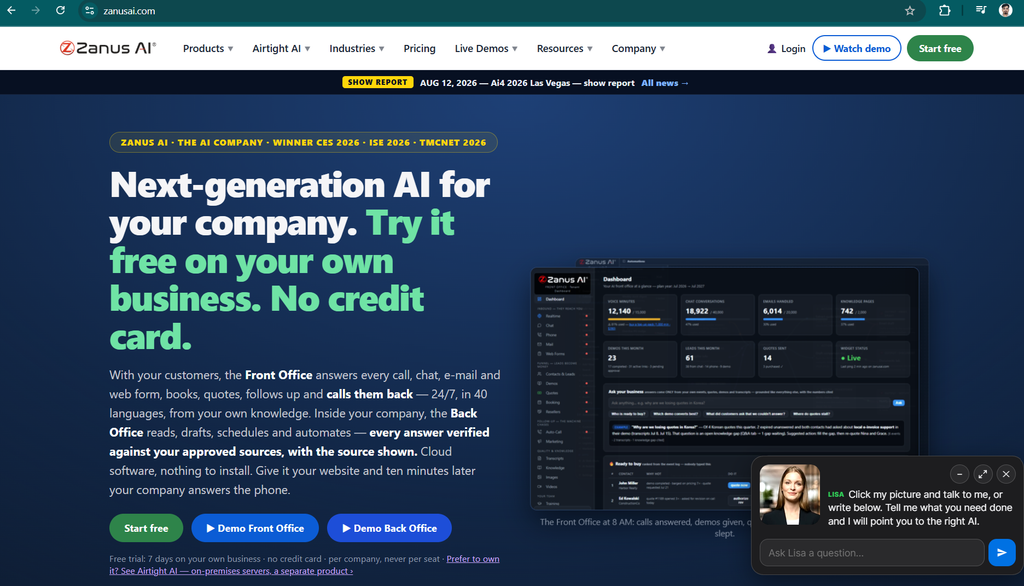
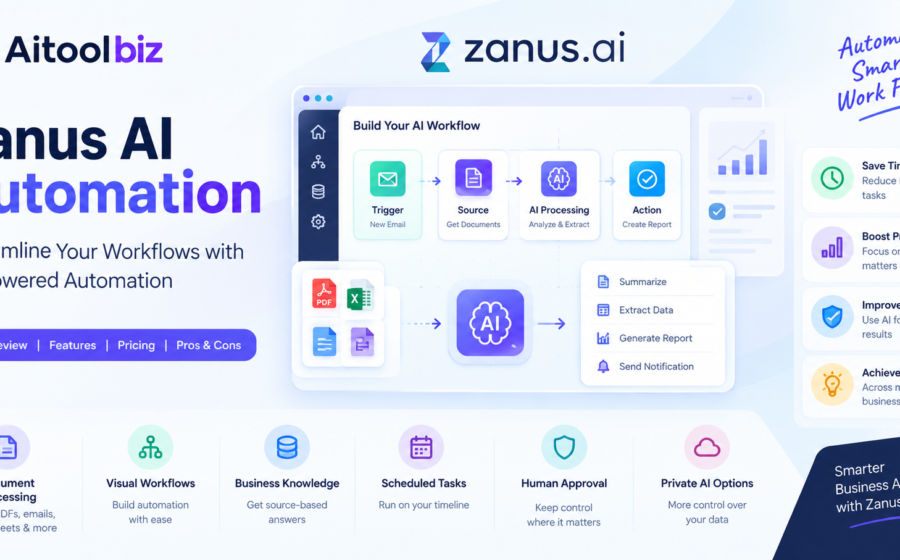
The system uses a visual automation canvas that connects triggers, information sources, AI processing steps, and actions. This approach makes it possible to represent a workflow as a series of connected steps rather than relying exclusively on manually written instructions or conventional if-then rules.
Zanus AI also offers Front Office solutions for customer-facing activities, including answering inquiries and handling selected sales and service workflows. These are related products within the broader platform, but they should not be confused with every feature of the Back Office automation system.
You can explore the platform on the official Zanus AI website.
How Does Zanus AI Automation Work?
Zanus AI Automation is designed to turn recurring business processes into workflows that can run with less manual intervention.
Although the exact setup depends on the workflow and the systems involved, the general process can be understood through four stages.
1. Define the Workflow
First, identify a repetitive task that your business wants to automate.
For example, a company may want to process incoming customer complaints, prepare weekly performance reports, or organize documents received through email.
The user describes the intended process in plain language, and the automation system helps represent it as connected workflow steps.
2. Connect Triggers and Information Sources
A workflow needs a reason to start and information to process.
Depending on the configured workflow, a trigger might be an incoming email, a submitted form, a new file, a scheduled task, or a change in a record.
The automation can then use relevant business information, documents, and connected systems to complete its assigned task.
Available integrations and permissions should be checked for the particular workflow you intend to build.
3. Let AI Process the Information
The AI step can interpret incoming information, compare it with relevant business documents, and prepare an appropriate output.
For example, it might summarize a document, classify a support request, extract important details, or draft a response using company procedures.
Zanus AI’s Back Office materials describe source-based verification and citations as part of its approach to making AI-generated answers easier to review.
4. Review Results and Take Action
Once the AI has processed the information, the workflow can prepare an output or initiate a configured action.
Depending on the setup, this could mean creating a task, filing a document, drafting an email, updating a record, or sending the result to a person for approval.
Human review remains important when a workflow involves sensitive information, customer commitments, financial decisions, or other consequential actions.
Key Features of Zanus AI Automation
Zanus AI’s automation offering focuses on combining AI capabilities with practical business processes. The following features are particularly relevant to organizations evaluating the platform.
1. Visual Workflow Automation
One of the main features is its visual automation canvas.
Rather than treating an automation as a long, difficult-to-understand script, users can work with connected blocks representing triggers, sources, AI processing, and actions.
This can make workflows easier to understand, inspect, and maintain.
For example, an invoice-processing workflow might follow this structure:
- Trigger: A new invoice arrives.
- Source: Retrieve the invoice and relevant purchase information.
- AI processing: Extract details and compare the information.
- Action: Prepare a summary and route the result for review.
The exact actions available will depend on the connected systems and workflow configuration.
2. AI-Powered Document Processing
Businesses regularly receive information in different formats, including emails, PDFs, spreadsheets, scanned documents, and reports.
Zanus AI’s Back Office platform is designed to help process business information and use it in automated workflows.
Possible applications include summarizing documents, extracting important information, preparing reports, and drafting responses.
This can be useful for companies that spend considerable time reading documents and transferring information between systems.
However, AI-generated outputs should be checked for missing information, extraction mistakes, and incorrect interpretations before being used for important decisions.
3. Business Knowledge and Source-Based Answers
Another important capability is the use of company-approved information.
Organizations often maintain procedures, product documentation, policies, contracts, and internal guidelines. Finding the correct document or version can take time, especially when information is scattered across different locations.
Zanus AI describes features that allow its Back Office system to retrieve relevant business information and provide answers with supporting sources.
This can help employees find information more efficiently and reduce the risk of relying on outdated documents.
The usefulness of these answers still depends on the quality, accuracy, and freshness of the information provided to the system.
4. Automated Reports and Summaries
Preparing regular reports can consume significant time in operations, customer service, manufacturing, and administrative teams.
Zanus AI’s automation examples include compiling operational information into recurring reports and summaries.
A business could use this approach to prepare a daily activity summary, organize incoming requests, or compile information for a weekly operations meeting.
Automation can reduce repetitive preparation work, although employees may still need to verify the results and add business context.
5. Scheduled AI Workflows
Some tasks do not need to start immediately after an email or file arrives. They need to happen at a specific time or repeat on a schedule.
Zanus AI’s Back Office materials describe scheduled AI work for activities such as recurring reporting, exception reviews, and procedure audits.
For example, a business could configure a recurring review of operational exceptions and have the results prepared before a scheduled team meeting.
This approach can help establish a consistent routine without depending entirely on employees remembering every task.
6. Workflow Monitoring and Run History
Automation is useful only when businesses can understand whether it is working correctly.
Zanus AI describes workflow run visibility, including identifying failed steps and reviewing individual executions.
This can help teams investigate problems, identify where a process stopped, and retry eligible failed steps.
For businesses running multiple workflows, monitoring is particularly important because an unnoticed failure can delay a report, leave a request unprocessed, or prevent a notification from reaching the right person.
7. Human Approval and Exception Handling
Not every business process should run completely without human supervision.
Some tasks require judgment, especially when information is incomplete, instructions conflict, or the potential consequences of a mistake are significant.
Zanus AI’s business operations materials describe routing exceptions and preparing outputs for human review.
For example, an automation might draft a response to a customer complaint but leave the final decision to a manager.
This combination of automation and human approval can help organizations reduce repetitive work without surrendering control over important decisions.
8. Private AI Deployment Options
Data privacy can be an important consideration when selecting business automation software.
Zanus AI offers cloud-based business software and separate private AI server solutions. Its website describes deployment options intended for organizations that want greater control over where their business data is processed.
These offerings are not identical, and their privacy characteristics depend on the product and deployment configuration selected.
Before adopting the platform, businesses should confirm data storage locations, retention policies, access controls, encryption, integration permissions, and applicable contractual commitments.
Organizations with strict regulatory requirements should request the relevant documentation rather than relying solely on general privacy statements.
Best Use Cases for Zanus AI Automation
Zanus AI Automation may be worth considering for businesses that repeatedly handle documents, requests, reports, and operational information.
Here are some examples of where AI-assisted workflows could be useful.
Customer Service
Customer service teams often receive similar questions, complaints, and requests throughout the day.
An automation workflow could classify incoming messages, retrieve relevant policies, prepare a draft response, and route complex issues to the appropriate team.
This can reduce manual sorting and preparation, while human employees remain responsible for cases that require judgment.
Administrative Tasks
Administrative departments frequently handle forms, correspondence, document organization, and routine reporting.
AI automation could help extract information from incoming files, prepare summaries, organize records, and create follow-up tasks.
These workflows are particularly useful when the same process is repeated many times.
Manufacturing and Quality Management
Manufacturing businesses need to manage production records, quality documentation, customer complaints, and operational reports.
Zanus AI’s manufacturing automation materials describe workflows that can gather relevant production information and prepare nonconformance reports or customer-response drafts.
Such workflows may help quality teams spend less time collecting information manually.
The final findings and any corrective actions should still be reviewed by qualified personnel.
Field Service and Repair Businesses
Field service companies manage service reports, technician notes, equipment manuals, and customer updates.
A workflow could use technician notes to prepare a draft service report and a customer-friendly summary after a job is completed.
Another potential use is organizing technical bulletins and identifying equipment models that may be affected by a new update.
These examples align with the types of field service workflows described on Zanus AI’s official website.
Business Operations
Operations teams often spend considerable time routing requests, investigating exceptions, reviewing procedures, and preparing recurring reports.
Zanus AI’s business operations offering is intended to help automate parts of these processes.
For example, a workflow might identify a delayed shipment, retrieve affected order information, prepare customer notifications, and send those drafts for approval.
The goal is to reduce repetitive coordination and make operational processes easier to monitor.
Zanus AI Automation Pricing: Is It Free?
Pricing is an important factor when choosing business automation software.
According to the official Zanus AI website, its Front Office product offers a seven-day trial on a company’s own business without requiring a credit card. This trial should not automatically be assumed to include every Back Office automation feature.
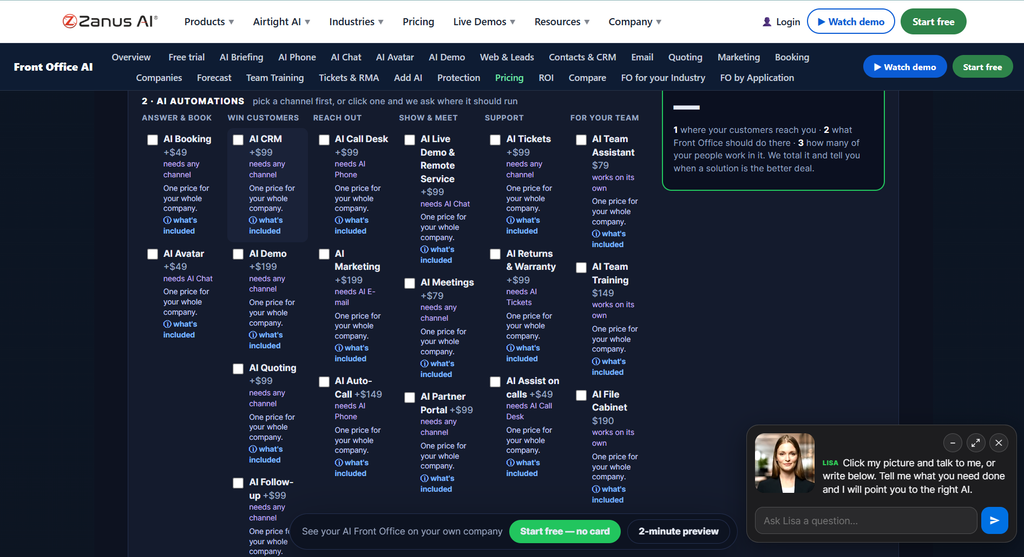
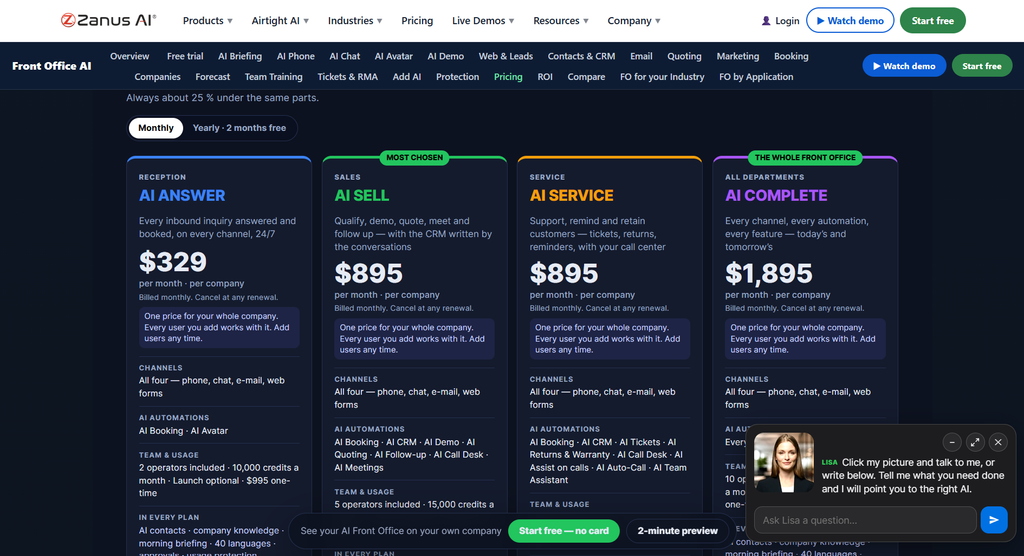
The company also offers separate Back Office and private AI server products, which have different pricing and deployment arrangements.
Because product offerings and prices can change, review the current official pages before making a purchasing decision.
You can start with the official Zanus AI website and explore the relevant product pages.
When evaluating pricing, consider the following factors:
- Subscription costs: Confirm the recurring fee for the specific product you need.
- Setup and onboarding: Ask whether configuration, integration, or onboarding services cost extra.
- AI usage: Check any applicable limits on processing capacity, conversations, or AI credits.
- Integration costs: Determine whether connecting your existing software requires additional work.
- Maintenance: For private server deployments, account for hardware, support, and ongoing administration.
- Return on investment: Compare the total cost with the time and resources saved through automation.
A free trial can be useful for evaluating the product, but it does not necessarily mean that the complete automation solution is free.
Pros and Cons of Zanus AI Automation
Every automation platform has strengths and limitations. The following table summarizes the main considerations for businesses evaluating Zanus AI.
| Pros | Cons |
|---|---|
| AI-assisted workflows can reduce repetitive manual work. | Initial workflow configuration may require planning. |
| Visual automation can make processes easier to understand. | Integration compatibility needs to be checked. |
| Can support document processing and report preparation. | AI outputs can still contain errors. |
| Source-based answers can help with verification. | Results depend on the quality of business information. |
| Workflow monitoring can help identify failures. | Workflows still require monitoring and maintenance. |
| Private AI deployment options are available. | Private server solutions may require additional investment and technical support. |
| Can be relevant to several business functions. | The best features and pricing depend on the product selected. |
These points reflect the platform’s described capabilities and general implementation considerations, rather than a claim that every feature has been independently tested.
Is Zanus AI Automation Easy to Use?
Zanus AI emphasizes describing workflows in plain language and representing them visually.
This approach may make automation more approachable for business users who understand their processes but do not want to build every workflow from scratch.
For example, a manager could begin with a straightforward task such as preparing a summary of incoming customer requests. The workflow could then be expanded to include classification, information retrieval, and routing.
However, ease of use depends on the complexity of the process.
A simple document-summary workflow may be relatively straightforward, while an automation involving several business systems, custom data fields, and complex approval rules may require technical assistance.
Businesses should test a representative workflow during the evaluation period and confirm that the intended team can operate and maintain it successfully.
Zanus AI Automation vs. Traditional Automation Tools
Traditional automation platforms typically connect applications and perform actions according to predefined rules.
For example, a conventional workflow might say: when a form is submitted, copy its fields into a spreadsheet and send a notification.
AI-assisted automation can add a step that interprets the information before deciding what to do next.
For example, the system could classify the request, retrieve a relevant procedure, draft a response, and route unusual cases to a person.
The difference is not that AI eliminates rules entirely. Instead, AI can handle certain tasks that require interpreting text or documents, while conventional triggers and rules continue to control when actions happen.
| Comparison | Traditional Automation | Zanus AI Automation |
|---|---|---|
| Main approach | Predefined rules and actions | Visual workflows with AI-assisted processing |
| Document interpretation | Often requires additional tools or rules | AI can interpret and summarize business information |
| Handling exceptions | Usually depends on configured conditions | AI can help classify exceptions and prepare responses |
| Human review | Depends on the workflow | Can be incorporated into configured approval processes |
| Monitoring | Depends on the platform | Zanus AI describes workflow run visibility |
| Best fit | Predictable, rule-based tasks | Processes that combine rules with document or language understanding |
The appropriate choice depends on the task. A simple rule-based process may not need AI, while a workflow involving varied documents or customer messages may benefit from AI-assisted processing.
Zanus AI Automation Alternatives
Zanus AI is not the only option for businesses looking to automate repetitive work.
The best alternative depends on whether you need application integrations, AI agents, visual workflows, or broader business process automation.
1. Zapier
Zapier is a popular automation platform that connects applications and creates workflows called Zaps.
It can be useful for automating repetitive actions between compatible services, such as transferring form submissions, sending notifications, and organizing information.
Best for: Small businesses and teams that want to connect existing applications with relatively straightforward workflows.
Read Full Review: Jasper AI Review 2026: Features, Pricing, Pros, Cons & Alternatives
2. Make
Make provides a visual environment for connecting applications and designing multi-step workflows.
Its scenario-based approach can be useful for teams that need conditional logic, data transformations, and more complex integrations.
Best for: Users who want visual control over multi-step application workflows.
3. n8n
n8n is a workflow automation platform that supports integrations, custom logic, and AI-related workflows. It also offers self-hosting options.
It may appeal to technical teams that want more control over their automation infrastructure.
Best for: Developers and technically confident teams building customizable workflows.
4. Microsoft Power Automate
Microsoft Power Automate supports workflow automation across Microsoft products and compatible external services.
It can help automate approvals, notifications, data handling, and repetitive tasks within Microsoft-centered business environments.
Best for: Organizations already using Microsoft 365 and related business applications.
5. UiPath
UiPath offers robotic process automation and broader automation capabilities for business processes.
It can be relevant to organizations that need to automate repetitive tasks across applications, including processes involving legacy systems.
Best for: Businesses with more complex enterprise automation requirements.
Which Alternative Should You Choose?
Choose Zapier if your main goal is connecting everyday applications. Consider Make if you prefer visual, multi-step workflows. Explore n8n if you want more technical flexibility, Power Automate if your organization relies heavily on Microsoft tools, and UiPath if you have larger-scale process automation needs.
Zanus AI may be worth evaluating if you specifically want AI-assisted business workflows, source-based information retrieval, and related business AI capabilities in one ecosystem.
Compare the actual integrations, deployment options, support, and total cost before selecting a platform.
Is Zanus AI Automation Safe to Use?
Safety depends on how the product is configured, what information it can access, and which actions it is permitted to perform.
Zanus AI describes source-based verification for its Back Office system and offers private AI deployment options. These are relevant considerations for businesses evaluating the platform, but they should not be treated as a substitute for reviewing the product’s security documentation.
Before connecting sensitive company data, consider the following:
Data privacy: Confirm where information is processed and stored, how long it is retained, and whether it is used to train models.
Access permissions: Give the automation only the access required to complete its task.
Human approval: Require review for high-impact actions, including financial transactions, legal communications, and sensitive customer decisions.
Auditability: Check whether you can review workflow executions, generated outputs, and actions taken.
Integration security: Verify how API credentials and third-party connections are protected.
Accuracy: Test the system with realistic documents and unusual cases before deploying it widely.
For organizations working with regulated or confidential information, a security and compliance review should be completed before implementation.
Who Should Use Zanus AI Automation?
Zanus AI Automation may be worth considering for several types of organizations.
- Small businesses: Companies that want to reduce repetitive administrative work and improve customer-request handling.
- Growing companies: Teams that need more consistent workflows as the volume of documents and requests increases.
- Operations departments: Organizations that manage recurring reports, internal procedures, and operational exceptions.
- Manufacturing companies: Businesses that need to organize production information and prepare quality-related documentation.
- Service businesses: Companies that handle technician notes, service reports, and customer updates.
- Larger organizations: Businesses evaluating private AI deployment and more controlled approaches to internal automation.
However, it may be unnecessary for users who only need a basic application connection or a simple scheduled task. In those cases, a traditional automation tool may be easier and more economical.
Conclusion: Is Zanus AI Automation Worth It in 2026?
Zanus AI Automation is worth exploring for businesses that want to combine workflow automation with AI-assisted document processing, information retrieval, reporting, and exception handling.
Its visual workflow approach can help make business processes easier to understand, while source-based answers and human approval steps can support more controlled use of AI.
The platform is particularly relevant to companies that repeatedly handle documents, customer requests, and operational information. Its private AI deployment options may also interest organizations that need greater control over their AI infrastructure.
However, the right choice depends on your requirements, available integrations, implementation effort, security needs, and total cost. A simple automation task may be better served by Zapier or Make, while more technical teams may prefer n8n or other customizable platforms.
Our recommendation: Start by identifying one repetitive business process, test it with representative data, and measure whether the automation saves enough time to justify its cost. Verify the relevant features and pricing directly with Zanus AI before committing to a plan.
Frequently Asked Questions (FAQs)
What is Zanus AI Automation?
Zanus AI Automation is part of Zanus AI’s business software ecosystem. Its Back Office automation system combines workflow triggers, business information, AI processing, and configured actions to help automate recurring tasks.
Is Zanus AI Automation free?
Zanus AI advertises a seven-day trial for its Front Office product without requiring a credit card. The availability and terms of a trial for other products should be confirmed on the official website.
What can Zanus AI automate?
Depending on the selected product and configuration, it can support workflows involving document processing, report preparation, request classification, information retrieval, and operational exception handling.
Does Zanus AI Automation require coding?
Zanus AI describes a visual automation canvas and plain-language workflow creation. These features may reduce the need to write code for certain tasks, but complex integrations and customized processes may still require technical assistance.
Is Zanus AI suitable for small businesses?
It may be suitable for small businesses that handle enough repetitive work to justify an AI automation platform. Smaller teams should compare its total cost and setup requirements with simpler alternatives.
Does Zanus AI offer private AI deployment?
Yes. Zanus AI offers separate private AI server solutions in addition to its cloud-based software. The exact deployment arrangement and security properties depend on the product selected.
What are the best alternatives to Zanus AI Automation?
Alternatives include Zapier, Make, n8n, Microsoft Power Automate, and UiPath. Each serves different automation needs, so the best choice depends on integrations, technical requirements, and budget.
Can Zanus AI Automation replace employees?
It can help reduce repetitive tasks and support employees with document processing, reporting, and workflow coordination. It should not be assumed to replace all human work, especially when tasks require judgment, accountability, or specialist expertise.
Is Zanus AI Automation worth trying?
It may be worth trying if your business has recurring processes that combine document interpretation, information retrieval, and follow-up actions. Test a real workflow and evaluate its accuracy, reliability, and cost before adopting it at scale.
Where can I learn more about Zanus AI Automation?
Visit the official Zanus AI website to explore its products, review available demonstrations, and confirm current pricing and features.