


Claude Review
Claude is an AI assistant developed by Anthropic that helps users write content, analyze documents, summarize information, solve problems, generate code, and complete a wide range of everyday and professional tasks. It is particularly worth considering for users who want thoughtful long-form writing, document analysis, coding assistance, and help with complex projects.
Unlike AI tools built primarily for marketing copy, Claude is a general-purpose AI assistant that can support students, bloggers, developers, researchers, professionals, and businesses. Its usefulness depends on the task, the model selected, the subscription plan, and how clearly users describe their requirements.
But is Claude worth using in 2026? In this review, we examine its main features, pricing, advantages, disadvantages, use cases, and alternatives to help you decide whether it is the right AI assistant for you.
Review Rating on Our Side
| Category | Our Rating |
|---|---|
| Ease of Use | 9/10 |
| Features | 9/10 |
| AI Quality | 9/10 |
| Pricing | 8/10 |
| Customer Support | 7.5/10 |
| Overall | 8.5/10 |
Editorial note: These are provisional editorial ratings, not scores from a controlled hands-on benchmark. Test Claude against your own tasks before making a purchasing decision.
Table of Contents
About Claude
Claude is an artificial intelligence assistant created by Anthropic, an AI company founded in 2021 by former OpenAI employees. The company develops AI models and tools designed to assist people and organizations with reasoning, writing, coding, research, and other knowledge-intensive work.
Claude is available through its web interface, desktop applications, and mobile apps. Anthropic also provides developer access through its API, allowing businesses to integrate Claude’s capabilities into their own applications and workflows.

The platform is designed to help users work with natural language. Instead of learning complicated software commands, you can describe what you want in a prompt and ask Claude to produce an answer, draft a document, analyze information, or improve existing content.
For example, a blogger can ask Claude to develop a detailed article outline, a developer can request help debugging a program, and a business owner can use it to summarize a lengthy report.
Claude also supports document and image analysis, depending on the feature and plan available. Its additional capabilities can include web search, file creation, code execution, Projects, integrations, and specialized coding tools.
The main reason to consider Claude is its flexibility. It is not limited to one particular industry or content format. However, like other AI assistants, it can make mistakes, misunderstand instructions, or produce information that requires independent verification.
How We Evaluated Claude
This review considers Claude’s publicly documented capabilities, pricing information, typical use cases, and practical limitations. It is intended to help readers understand what the platform offers rather than suggest that every feature has been independently benchmarked.
We considered the following factors:
- Ease of setup and use
- Writing quality and editing assistance
- Reasoning and problem-solving capabilities
- Coding and debugging support
- Document and image analysis
- Research and information gathering
- File creation and productivity features
- Subscription pricing and value
- Potential limitations and accuracy concerns
For a more rigorous comparison, users should test Claude, ChatGPT, and other alternatives using the same prompts, source documents, and evaluation criteria.
Claude Features
Claude includes several capabilities that make it useful for writing, research, programming, and productivity. The features available to you may depend on your subscription, region, selected model, and current product rollout.
1. AI Writing and Content Creation
Claude can help create, rewrite, expand, summarize, and edit written content. Users can request blog posts, articles, emails, product descriptions, reports, social media captions, and other text-based materials.
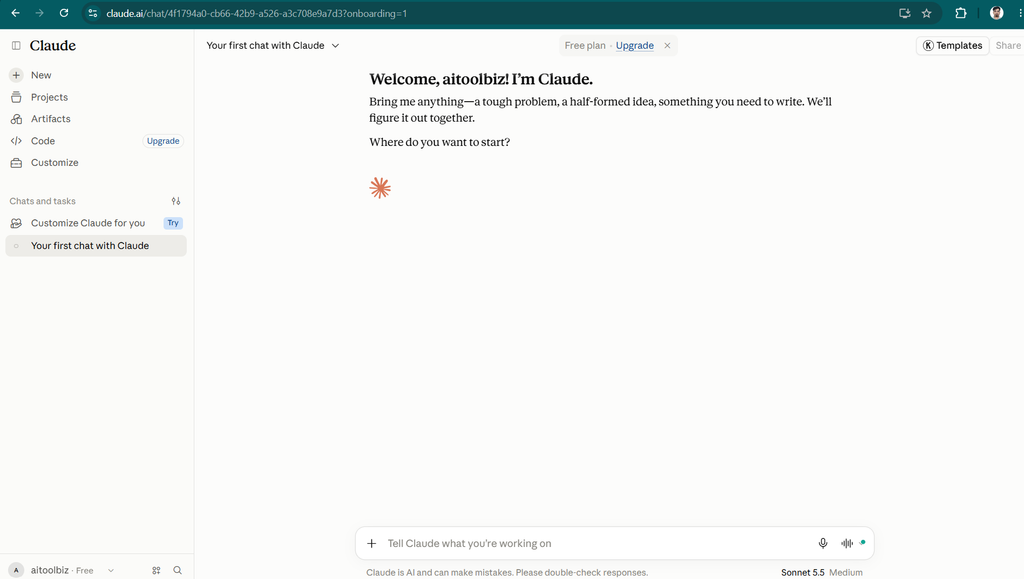
It is also useful for improving existing drafts. You can ask it to make a paragraph clearer, adjust the tone, reorganize an article, or explain a complicated idea in simpler language.
For bloggers and content marketers, Claude can help with:
- Blog outlines and first drafts
- SEO article structures
- Product descriptions
- Email newsletters
- Website copy
- Social media content
- Grammar and readability improvements
However, AI-generated content still requires editing. Claude may repeat ideas, overlook important details, or produce generic writing when the prompt lacks context. It should be treated as a writing assistant rather than a replacement for editorial judgment.
2. Document Analysis
One of Claude’s useful capabilities is working with documents and other supported files. Depending on the interface and file type, users can upload material and ask questions about its contents.
For example, you could provide a lengthy report and request an executive summary, ask for the main findings from a research document, or compare information across several supplied files.
This can help professionals save time when reviewing contracts, reports, manuals, research papers, and internal documentation.
Users should still verify important conclusions against the original documents, especially when the material involves legal, financial, medical, or other high-stakes decisions.
3. Coding and Debugging
Claude can assist developers with writing code, explaining programming concepts, identifying potential bugs, reviewing functions, and improving existing projects.
It can help beginners understand unfamiliar code and assist experienced developers with routine programming tasks. Claude Code provides additional capabilities for working with codebases and development workflows through supported paid plans.
Common coding tasks include:
- Generating code from written requirements
- Explaining errors and debugging approaches
- Refactoring existing code
- Writing tests
- Documenting functions
- Reviewing code for possible problems
- Understanding unfamiliar repositories
Claude’s coding output should always be tested. Code that looks correct in a conversation may still contain bugs, security weaknesses, or compatibility issues.
4. Research and Web Search
Claude can help organize research questions, summarize supplied sources, compare viewpoints, and gather information when web search or research features are available.
This can be useful for preparing reports, investigating unfamiliar topics, developing article outlines, and identifying questions that need further research.
However, access to web search does not guarantee that every answer is current or accurate. Users should check original sources, verify important claims, and distinguish sourced facts from the model’s interpretation.
For SEO professionals, Claude can assist with research and content planning, but it should not be considered a complete replacement for dedicated keyword research, backlink analysis, rank tracking, or technical SEO tools.
5. Projects and Context Management
Projects help users organize related conversations, files, and instructions around a particular topic or ongoing task.
For example, a blogger might create a project for a website and provide its writing guidelines, target audience, and preferred article structure. A developer might organize documentation and discussions for a software project.
Keeping related information together can reduce the need to repeat instructions in every conversation.
The quality of the results still depends on the information supplied. Users should keep project instructions clear and ensure that uploaded material is accurate and up to date.
6. Artifacts and Interactive Content
Claude’s Artifacts feature can display certain outputs in a separate workspace rather than leaving everything inside a standard chat response.
Depending on the task, this may be useful for presenting documents, code, diagrams, interactive prototypes, and other structured outputs.
For example, a user could ask Claude to create a simple web-page prototype, draft a small utility, or present information in a more organized format.
Artifacts can make it easier to review and refine certain kinds of work. However, more complicated applications may still require development, testing, hosting, or integration with external services.
7. Data Analysis and File Creation
Claude can assist with interpreting structured information, examining datasets, explaining calculations, and creating supported files. Some workflows also provide code execution or other tools for carrying out more complex tasks.
A small business owner could use it to summarize sales data, a researcher could request help understanding a dataset, or a content creator could ask for information to be organized into a spreadsheet.
These capabilities can reduce repetitive work, but results should be checked for incorrect calculations, missing data, and unsupported assumptions.
8. Integrations and Productivity Tools
Claude supports integrations and connectors that can help users work with information from supported external services. Availability varies by plan, connected service, and configuration.
These capabilities may help users bring relevant information into conversations, streamline research, and organize work across different applications.
Before connecting an external service, review its permissions and the information Claude may be allowed to access. Do not assume that every integration is available on every plan.
Short Feature Summary
Claude is more than a basic text generator. It combines conversational assistance with writing, coding, document analysis, research, and selected productivity features.
Its strongest potential value is helping users work with complex information and complete tasks through natural-language instructions. Projects can organize ongoing work, while Artifacts and coding capabilities provide additional ways to turn ideas into practical outputs.
Nevertheless, not every user needs these advanced capabilities. Someone who only wants occasional email drafts or short social media captions may find a free AI assistant sufficient.
Claude Pricing
Claude offers a free plan and paid subscriptions for users who need additional usage or capabilities. Its available plans and features can change, so check the official pricing page before purchasing.
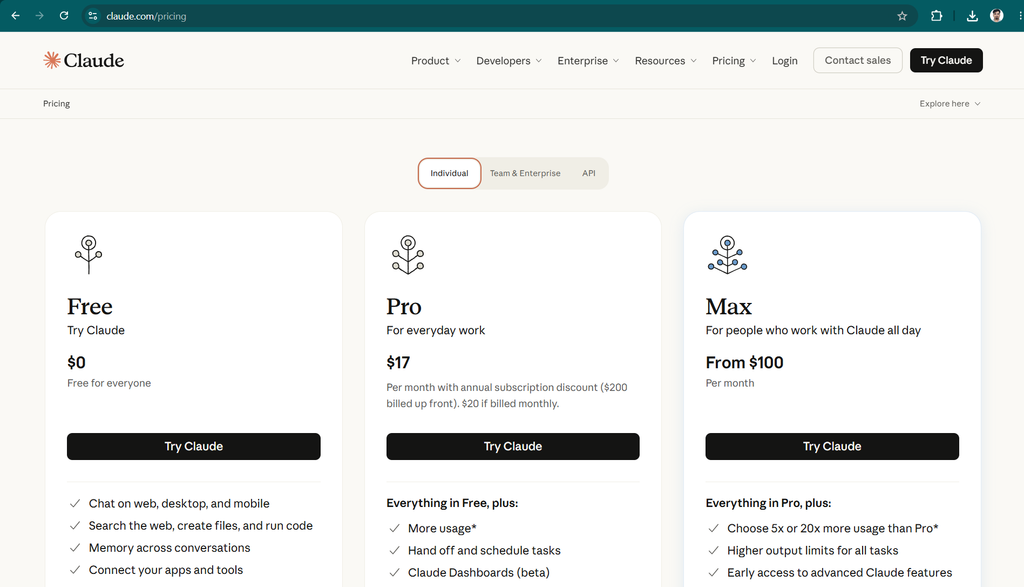
The following table reflects the publicly listed individual plan prices checked for this review.
| Plan | Price | Best For | Key Features |
|---|---|---|---|
| Free | $0 | Beginners and occasional users | AI chat, writing, supported file and image analysis, web search, and selected productivity features |
| Pro | $17/month | Regular individual users | More usage, additional models and features, Projects, Research, and Claude Code access |
| Max 5x | $100/month | Heavy users | Everything in Pro with substantially higher usage limits |
| Max 20x | $200/month | Intensive daily users | Everything in Pro with the highest listed individual Max usage tier |
Pricing is in US dollars. Annual billing, regional availability, taxes, usage limits, and feature access may vary. Confirm the current details before subscribing.
Is Claude Free?
Yes. Claude has a free plan that allows users to try the assistant without paying for an individual subscription.
The free plan can be suitable for occasional writing, everyday questions, document-related tasks, and exploring supported features. However, usage limits apply, and access to particular models or advanced features may differ from paid plans.
If you are unsure whether Claude suits your needs, start with the free plan before committing to a subscription.
Is Claude Pro Worth the Price?
Claude Pro is worth considering if you use Claude regularly for writing, research, coding, or longer projects and frequently encounter the limitations of the free plan.
The annual option can lower the effective monthly cost compared with paying month by month, but it requires an upfront payment. Before choosing it, consider how often you use the tool and whether its features justify the expense.
The Max plans are designed for people who need significantly more usage. They may be unnecessary for casual users or anyone who only asks a few questions each day.
Official pricing: Claude Pricing
Claude Pros and Cons
Claude has several advantages, but it is not the ideal solution for every user.
| Pros | Cons |
|---|---|
| Useful for long-form writing and editing | Can generate incorrect or misleading information |
| Helps analyze lengthy documents | Free-plan usage is limited |
| Supports coding and debugging workflows | Complex code still needs testing |
| Can organize ongoing work with Projects | Advanced features may require a paid plan |
| Offers document and image analysis | Results depend on prompt quality and supplied context |
| Provides selected research and productivity tools | Not a complete replacement for specialist software |
| Offers a free plan to get started | Heavy users may need a more expensive subscription |
Who Should Use Claude?
Claude is best suited to people who want a flexible AI assistant for writing, analysis, research, coding, and knowledge-based work.
Bloggers and Content Writers
Bloggers can use Claude to develop article outlines, improve drafts, simplify complicated topics, and brainstorm content ideas. It may also help maintain a consistent tone when given clear examples and editorial instructions.
However, writers should fact-check claims, add original insights, and ensure that published articles meet their own quality standards.
Students and Researchers
Students can use Claude to explain difficult concepts, summarize supplied reading materials, organize study notes, and generate practice questions.
Researchers may find it helpful when reviewing documents or exploring unfamiliar topics. It should support learning and investigation rather than replace source verification or independent thinking.
Developers and Programmers
Developers can use Claude for coding assistance, debugging, documentation, testing ideas, and understanding existing code.
Its value is particularly relevant to people who work with substantial codebases or need help reasoning through programming problems. All generated code should be reviewed and tested before use.
Freelancers and Small Business Owners
Freelancers and business owners can use Claude to draft proposals, prepare client emails, summarize reports, create marketing content, and organize business information.
The free plan may be enough for occasional tasks, while frequent users may benefit from a paid plan.
Marketing Teams and SEO Professionals
Marketing teams can use Claude for brainstorming campaigns, developing content briefs, drafting website copy, and summarizing research.
However, users who need detailed keyword metrics, backlink analysis, competitor tracking, or technical website audits will still need dedicated SEO tools.
Claude Use Cases
Claude can support a range of practical workflows.
1. Blog Writing
A content creator can ask Claude to develop a blog outline, draft individual sections, improve readability, and identify areas where additional research is required.
A more effective workflow is to provide the target audience, search intent, verified facts, and the article’s purpose instead of asking for a generic article.
2. Email and Business Communication
Claude can draft professional emails, improve the tone of existing messages, summarize long discussions, and help prepare proposals.
Users should review the final text before sending it, especially when it contains sensitive information or business commitments.
3. Research and Summarization
Users can provide reports, notes, and other supported documents and ask Claude to summarize the main points or compare different arguments.
For research that depends on current information, verify the original sources and publication dates.
4. Programming and Website Development
Claude can help explain HTML, CSS, JavaScript, and other programming concepts. It can also assist with debugging, code review, and planning new features.
For WordPress users, it may help explain theme requirements, draft snippets, and troubleshoot common issues. Beginners should test changes safely and back up their websites before modifying important files.
5. Learning and Productivity
Claude can explain difficult subjects in simpler language, create revision plans, help structure notes, and break large projects into smaller tasks.
It is most useful when users ask follow-up questions and verify important information rather than accepting every answer automatically.
Claude Alternatives
Claude is a strong general-purpose assistant, but several alternatives may better suit particular requirements.
| Claude Alternative | Best For | Starting Price |
|---|---|---|
| ChatGPT | General-purpose AI, writing, research, coding, and interactive tools | Free plan; paid plans available |
| Google Gemini | Google’s AI ecosystem and supported Google service integrations | Free plan; paid plans available |
| Microsoft Copilot | AI assistance within supported Microsoft products | Free options; paid plans available |
| Perplexity | Research-oriented answers and source discovery | Free plan; paid plans available |
| Jasper | Marketing content, brand voice, and business content workflows | Paid plans; verify current pricing |
| Copy.ai | Sales and marketing workflows | Paid plans; verify current pricing |
| Writesonic | SEO-oriented content and AI search visibility tools | Free or paid options may vary |
1. ChatGPT
ChatGPT is a useful alternative for people who want a general-purpose AI assistant for writing, research, coding, brainstorming, data analysis, and interactive experiences.
It may be a better fit if you want a broad set of tools and flexible ways to work with different kinds of tasks.
2. Google Gemini
Gemini is worth considering for users who want Google’s AI assistant and access to supported Google ecosystem features.
Its usefulness depends on the applications you already use, the integrations available to your account, and the capabilities offered by your chosen plan.
3. Microsoft Copilot
Microsoft Copilot may suit users who rely on Microsoft products and want AI assistance with supported productivity workflows.
Before subscribing, check which features are included in the specific consumer or business offering you intend to use.
4. Perplexity
Perplexity is worth exploring when research, source discovery, and citation-oriented answers are your main priorities.
It can complement a writing assistant, although users should still open the original sources and verify that they support the claims being made.
5. Jasper
Jasper is a more specialized option for marketing teams that need brand voice management and structured marketing content workflows.
Claude is more general-purpose, while Jasper’s marketing-specific tools may be more relevant to organizations producing large volumes of branded campaigns.
Also Read: Jasper AI Review 2026: Features, Pricing, Pros, Cons & Alternatives
6. Copy.ai
Copy.ai focuses on sales and marketing workflows. Businesses looking to structure repetitive go-to-market tasks may find it more relevant than a general-purpose conversational assistant.
The best choice depends on whether you need flexible AI assistance or a platform designed around specific business processes.
Conclusion
Claude is a capable AI assistant for writing, document analysis, coding, research, and productivity. Its flexible conversational interface makes it useful for bloggers, students, developers, researchers, freelancers, and businesses.
Who should consider it? Claude is a strong option for people who regularly work with lengthy documents, need help developing written content, or want an AI assistant for coding and complex tasks.
Who may not need it? Casual users who only want occasional answers, short emails, or simple writing assistance may be comfortable with a free plan from Claude or another AI provider.
Biggest advantage: Claude’s versatility across writing, analysis, coding, and document-based workflows.
Biggest weakness: Its responses are not always accurate, and usage limits or paid subscriptions can become important for frequent users.
Do we recommend it? Yes, Claude is worth trying, particularly if your work involves substantial writing, document analysis, or programming. Start with the free plan, test it on real tasks, and upgrade only if the additional usage and features provide enough value for your needs.
you can Read: 15 Best AI Writing tools in 2026
Frequently Asked Questions
What is Claude AI used for?
Claude is an AI assistant used for writing, editing, summarizing documents, coding, research, answering questions, and helping users complete professional and everyday tasks.
How much does Claude cost?
Claude offers a free plan. The individual Pro plan is listed at $20 per month or $200 per year, while Max plans are listed at $100 and $200 per month. Check the official pricing page for current rates and availability.
Is Claude free to use?
Yes. Claude offers a free plan with limited usage. Some advanced capabilities and higher usage limits are available through paid subscriptions.
Is Claude better than ChatGPT?
Neither tool is universally better. Claude may appeal to users who prioritize particular writing, document-analysis, and coding workflows, while ChatGPT offers a broad collection of general-purpose and interactive capabilities. The best choice depends on your tasks and preferred workflow.
Is Claude good for SEO content writing?
Claude can help with SEO content outlines, article drafts, rewriting, topic research, and readability improvements. It does not replace dedicated keyword research, rank tracking, backlink analysis, or technical SEO tools. Always verify facts and add original value before publishing.
Can Claude write code?
Yes. Claude can generate, explain, review, and troubleshoot code. Claude Code provides additional coding workflow capabilities on supported plans. Generated code must be tested and reviewed before deployment.
Is Claude safe and reliable?
Claude can be useful, but it can produce inaccurate information or misunderstand instructions. Avoid sharing sensitive information unnecessarily, review privacy settings, and independently verify important answers.
Can Claude analyze PDFs and other documents?
Claude supports document-related workflows and can answer questions about supported uploaded files. Exact file support and limits may vary. Check important summaries against the original documents.
Is Claude worth paying for?
Claude may be worth paying for if you use it frequently and need more usage or additional features. If your needs are occasional, try the free plan first and evaluate whether a subscription would save enough time to justify its cost.


1 Comment