AI Smart Review
AI-powered social media management is becoming increasingly popular among businesses, content creators, freelancers, and digital marketing agencies. Instead of manually researching topics, writing captions, designing graphics, and scheduling posts across multiple platforms, marketers can use AI tools to simplify their daily workflows.
One platform designed for this purpose is AI Smart, available at Digitalaismart. The platform aims to bring content research, AI-assisted creation, social media planning, scheduling, and account management into one workspace.
But is AI Smart worth trying? What features does it offer, how much does it cost, and is it suitable for individual creators or marketing agencies?
In this AI Smart review, we will explore its main features, pricing information, advantages, disadvantages, alternatives, and potential use cases to help you decide whether it fits your social media marketing needs.
Quick Verdict: AI Smart looks promising for users who want to combine content research, AI-assisted creation, and social media publishing in one workspace. However, prospective users should verify current subscription prices, feature limits, and integrations before committing to a paid plan.
Disclosure: This article is an independent informational review. It is not sponsored by AI Smart. Features and pricing should be verified directly with the provider before making a purchase.
Table of Contents
What Is AI Smart?
AI Smart is an AI-powered social media management platform designed to help businesses and marketing teams manage content production and publishing from a centralized workspace.
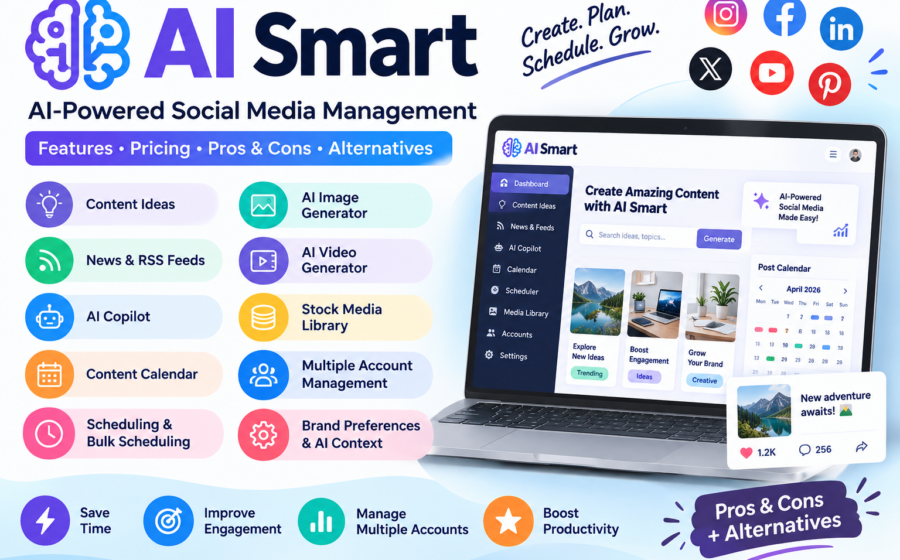
Rather than relying on separate tools for idea generation, research, media creation, and scheduling, users can explore a connected workflow within one platform. Its advertised features include news discovery, RSS feeds, content ideas, an AI Copilot, stock media, calendar planning, scheduling, and multiple-account management.

The platform is particularly relevant to people who need to publish content consistently but struggle with limited time, repetitive tasks, or managing several brands at once.
For example, a social media manager working with three small businesses might need to research industry news, create platform-specific captions, prepare visuals, organize a monthly calendar, and schedule posts. AI Smart aims to bring many of these tasks into a shared workflow.
AI Smart is not simply a general-purpose chatbot. Its primary focus is the social media content workflow, including the steps between discovering an idea and preparing it for publication.
You can explore the platform at Digitalaismart
AI Smart at a Glance
| Category | Details |
|---|---|
| Tool Name | AI Smart |
| Official Website | https://digitalaismart.com/ |
| Main Purpose | AI-powered social media management and automation |
| Target Audience | Content creators, businesses, marketers, and agencies |
| Content Research | News, RSS feeds, trends, and competitor activity |
| AI Capabilities | Content ideas, AI assistance, and media generation features |
| Organization | Calendar planning and account preferences |
| Publishing Workflow | Scheduling and bulk scheduling |
| Account Management | Multiple-account workspace |
| Pricing | Free starting option and paid plans; verify current details |
| Best For | Users who want a connected social media workflow |
These details reflect the platform’s advertised offering. Actual availability may vary by subscription plan.
Key Features of AI Smart
1. AI Content Ideas
Coming up with fresh social media content ideas every day can be challenging, particularly when managing multiple accounts. AI Smart’s Content Ideas feature aims to identify potential topics using trends, news, competitor activity, and other content sources.
Instead of beginning with a blank page, users can explore potential content angles and decide which ones are relevant to their audiences.
Why it matters: This feature may help marketers maintain a more consistent publishing schedule and spend less time brainstorming.
However, not every suggested idea will suit every audience. Users should still check relevance, accuracy, and originality before publishing.
2. News and RSS Feed Monitoring
AI Smart includes news and RSS feed features that help users discover information from external sources. These tools can provide inspiration for timely social media posts without requiring marketers to visit every website individually.
For example, a technology blog could monitor AI industry news, identify an interesting development, and use that information as inspiration for a LinkedIn post.
The advantage is a more organized research process. Nevertheless, users should verify important facts and link to reliable sources when publishing news-related content.
3. AI Copilot
An AI Copilot is intended to help users with marketing-related tasks such as brainstorming, rewriting copy, improving captions, and developing content ideas.
For a small business, this could mean turning a rough product description into a more engaging social media caption. An agency might use AI assistance to develop alternative headlines or adapt a campaign message for different audiences.
The value of this feature depends on how well the assistant follows instructions and understands the brand’s context. AI-generated text may still need editing to remove generic language, incorrect information, or unsupported claims.
4. AI Social Media Scheduler
Planning and scheduling are central parts of AI Smart’s offering. Its website describes an AI Scheduler intended to help users prepare content for multiple platforms and organize future publishing.
This can be useful for creators who prefer preparing several posts in one sitting instead of creating content every day.
A planned schedule can also make it easier to coordinate product launches, seasonal campaigns, promotional offers, and educational content.
Before relying on automatic publishing, check which social networks and post formats are supported by your account. Platform permissions and API restrictions can affect whether a post publishes automatically or requires additional action.
5. Calendar Planner
The Calendar Planner gives users a way to organize upcoming social media content in one place.
A content calendar can help marketers answer practical questions:
- Which posts are scheduled for this week?
- Are there gaps in the publishing schedule?
- Which campaign needs more content?
- Are important dates or product launches covered?
AI Smart presents calendar planning as part of its connected content workflow.
This feature could be particularly useful for agencies handling several clients, although its value depends on usability and integration with the user’s existing workflow.
6. AI Image Generator and AI Video Generator
AI Smart’s advertised feature list includes an AI Image Generator and an AI Video Generator. These features are intended to help users prepare visual assets for social media content.
Visual content is important on platforms where images, short videos, and other creative formats play a significant role in attracting attention.
For example, a business could use AI assistance to develop a visual concept for a promotional campaign rather than beginning the creative process from scratch.
However, the quality of generated visuals should be assessed before publication. Users should check text rendering, brand consistency, image accuracy, and commercial-use terms.
7. Stock Media Library
AI Smart also lists stock media as part of its platform. Access to a media library may help users find visual assets without searching through several separate services.
This can be helpful when preparing posts for a product launch, educational campaign, announcement, or seasonal promotion.
Before using any asset commercially, check the relevant licensing conditions. The availability of an image or video does not automatically mean it can be used for every purpose.
8. Multiple Account Management
Managing different brands can become complicated when each account has its own tone, content calendar, assets, and publishing requirements.
AI Smart promotes multiple-account management, allowing users to organize work for different clients or brands in one workspace. Its account preferences are intended to help tailor content to each account’s context.
This feature may appeal to freelancers, marketing agencies, and businesses operating several brands.
However, users should confirm account limits, team permissions, approval options, and the number of supported social channels before purchasing a subscription.
9. Bulk Scheduling
Bulk scheduling can reduce repetitive work when preparing many posts for future publication.
Rather than creating each scheduled item individually, users can prepare a larger batch of content and organize it according to their publishing plan.
AI Smart lists bulk scheduling among its features.
This can be especially useful for educational pages, ecommerce brands, agencies, and businesses that publish recurring content.
The exact import methods, scheduling limits, and supported formats should be checked before building a workflow around this feature.
10. Brand Preferences and AI Context
AI-generated content often sounds generic when a tool does not understand the intended audience, writing style, or business objectives.
AI Smart offers preferences designed to provide context about an account’s tone, audience, style, and topics.
For instance, a financial education brand may need a clear and professional tone, while a lifestyle brand might prefer a more conversational approach.
Providing better instructions can improve the relevance of AI drafts, although users should not assume every generated post will automatically match their brand voice.
AI Smart Pricing: Is It Free?
Pricing is an important factor when choosing an AI social media management platform.
AI Smart’s official pricing page lists four plan levels: Freemium, Starter, Creator, and Agency. However, its pricing information has indicated that details are being updated, so a complete, verified breakdown of current subscription prices and feature limits may not be available.
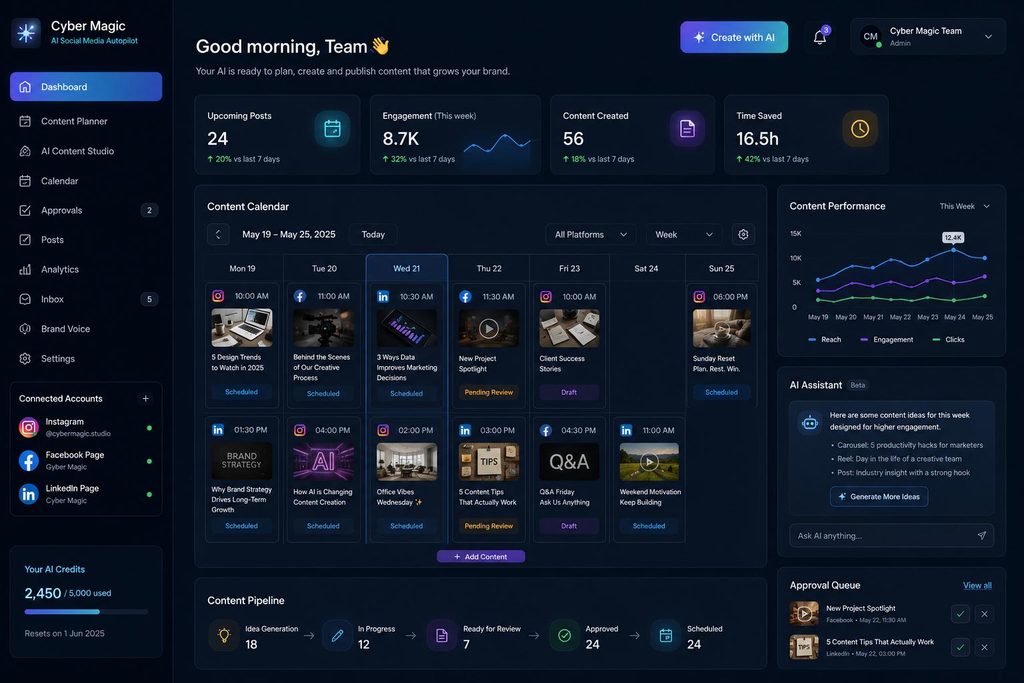
The main website advertises a free starting option and displays paid plans starting at $25 per month. Treat this as an indicative advertised price rather than a confirmed quote for every plan.
Official pricing page: Digitalaismart
Freemium Plan
The Freemium option provides a starting point for exploring the platform.
Before relying on it, check the current free usage limits and whether the features you need are included.
Starter Plan
The Starter plan is one of the subscription levels listed by the provider.
Confirm its current price, account limits, and included tools before upgrading.
Creator Plan
The Creator plan is another listed subscription level.
Compare the available content creation, scheduling, and media features to determine whether they justify the cost.
Agency Plan
The Agency plan is intended for agency-oriented workflows.
Businesses should verify client-account limits, team access, and approval features before choosing this option.
Is AI Smart Worth Paying For?
The answer depends on how much time the platform saves you and whether its features replace tools you already pay for.
A solo creator who publishes a few posts per week might be comfortable with a free plan or a simpler scheduler. A marketing agency managing multiple brands may benefit more from centralized account management and bulk scheduling.
Before upgrading, check:
- The number of social accounts included.
- Monthly AI generation or usage limits.
- Which social networks are supported.
- Whether image and video generation incur extra costs.
- Whether annual billing offers a different price.
- How cancellation and refunds work.
The most sensible approach is to test the free option first, if it meets your needs, and upgrade only after confirming that the workflow provides enough practical value.
How to Use AI Smart
If you are new to AI-powered social media tools, you can evaluate AI Smart through a simple workflow.
Step 1: Visit the Official Website
Open https://digitalaismart.com/ and review the available signup options.
The website advertises a free starting option, but check the current terms before registering.
Step 2: Set Up Your Workspace
Explore the account settings and connect a supported social media account if you are comfortable granting the necessary permissions.
Step 3: Find Content Ideas
Explore the news, RSS feeds, trends, and content research features to find topics relevant to your business.
Step 4: Create and Review Posts
Use the available AI assistance to draft captions and develop creative ideas. Edit the output to ensure it is accurate and appropriate for your audience.
Step 5: Schedule Your Content
Organize approved posts in the calendar, check the publication dates, and test the publishing workflow before depending on it for important campaigns.
The exact screens and available options may vary depending on your account and subscription.
Pros and Cons of AI Smart
Every AI tool has strengths and limitations. Based on AI Smart’s published features, here are the main advantages and potential drawbacks to consider.
| Pros | Cons |
|---|---|
| Combines several social media tasks in one workspace | Current subscription pricing needs confirmation |
| Offers AI-assisted content ideas | AI suggestions may require substantial editing |
| Includes news and RSS research tools | Research sources still need verification |
| Provides scheduling and calendar planning | Supported channels and publishing restrictions should be checked |
| Lists AI image and video generation features | Visual quality and usage limits need testing |
| Supports multiple-account workflows | Account and team limits may depend on the plan |
| Lists bulk scheduling capabilities | Setup and workflow learning may take time |
| Offers a free starting option | Free-tier limits may restrict regular use |
These points are based on the provider’s published offering rather than independent performance testing.
Who Should Use AI Smart?
Content Creators
Creators who need a steady supply of post ideas, captions, and scheduled content may appreciate having research and planning tools together.
Small Businesses
Businesses without a dedicated social media team may benefit from a more organized process for preparing promotional and educational content.
Also Read: 24 Best AI Tools for Business to Marketing, & Customer help
Marketing Agencies
Agencies managing multiple brands may find account organization, reusable context, and bulk scheduling particularly relevant.
Also Read: 6 Free ai marketing tools for small business
Ecommerce Businesses
Online stores that frequently promote products, launches, and seasonal offers may benefit from a consistent content calendar and AI-assisted creative workflow.
Who Might Not Need AI Smart?
AI Smart may be unnecessary for people who publish infrequently, manage only one social media account, or already have a satisfactory workflow using existing tools.
It may also be unsuitable for users who require a specific integration or advanced analytics feature that the platform does not offer on their chosen plan.
The best way to decide is to compare its actual capabilities with your existing process instead of paying for features you will rarely use.
Best AI Smart Alternatives
If AI Smart does not meet your requirements, several established platforms are worth comparing.
1. Buffer
Website: https://buffer.com/
Buffer is worth considering if your main priority is planning, publishing, and managing social media content through a straightforward workflow.
Best for: Creators, small businesses, and people who want a publishing-focused tool.
Also Read: Buffer Review 2026: Features, Pricing, Pros, Cons & Alternatives
2. Publer
Website: https://publer.io/
Publer is another option to investigate if you want to schedule content and organize publishing across supported social networks.
Best for: Freelancers, small teams, and social media managers comparing scheduling tools.
3. Sprout Social
Website: https://sproutsocial.com/
Sprout Social is worth evaluating if your organization needs a more comprehensive approach to social publishing, engagement, reporting, and team collaboration.
Best for: Businesses and marketing teams with broader management and reporting needs.
This is a shortlist of alternatives, not a verified ranking. Features, channel support, and current prices should be compared directly before choosing a subscription.
AI Smart vs. Buffer vs. Publer vs. Sprout Social
| Feature | AI Smart | Buffer | Publer | Sprout Social |
|---|---|---|---|---|
| Social Media Scheduling | Listed | Available | Available | Available |
| AI-Assisted Content | Listed | Check current offering | Check current offering | Check current offering |
| Content Calendar | Listed | Available | Available | Available |
| Multi-Account Workflows | Listed | Available options | Available options | Available |
| Advanced Reporting | Verify availability | Compare plans | Compare plans | A key offering |
| Pricing Transparency | Current details updating | Check official pricing | Check official pricing | Check official pricing |
AI Smart’s feature descriptions come from its official website. The other columns summarize general product positioning and are not a feature-by-feature plan audit.
Is AI Smart Legit and Safe to Use?
AI Smart has a publicly accessible website describing its social media management features and subscription options. That establishes what the provider advertises, but it does not independently establish the quality of every feature or guarantee the platform’s security.
Before connecting business accounts, consider these precautions:
- Review the privacy policy and terms of service.
- Check which permissions the platform requests for each connected social account.
- Avoid sharing passwords directly if a secure authorization method is available.
- Confirm how account data, uploaded media, and AI-generated content are handled.
- Test publishing with a low-risk post before scheduling an important campaign.
- Review cancellation terms before entering payment details.
A definitive security or legitimacy judgment cannot be made solely from the website’s marketing claims. Users should evaluate the provider’s policies and account permissions before trusting it with business data.
Conclusion: Is AI Smart Worth Trying in 2026?
AI Smart is an interesting option for businesses, content creators, and marketing agencies looking to organize their social media workflow. Its advertised combination of content research, AI assistance, visual creation, scheduling, and multi-account management could be useful for people who spend considerable time moving between separate marketing tools.
Its biggest potential advantage is bringing multiple stages of social media production into one workspace. Instead of treating research, writing, creative production, and scheduling as completely separate tasks, users can aim to manage them as parts of a connected process.
However, there are important considerations. Detailed subscription pricing is currently being updated, the practical quality of the features needs to be evaluated, and supported integrations should be verified before committing to a paid plan.
My Recommendation: Try the free option if it suits your needs, test the features most important to your workflow, and compare the results with your current tools. AI Smart is worth considering, but its real value will depend on whether it saves you time without compromising content quality or control.
For more AI software reviews and comparisons, explore https://aitoolbiz.com/.
Frequently Asked Questions About AI Smart
What Is AI Smart Used For?
AI Smart is designed to help users research social media topics, develop content ideas, create media, plan publishing calendars, schedule posts, and manage multiple accounts in one workspace.
Is AI Smart Free?
The official website advertises a free starting option and lists a Freemium plan. However, current usage limits and included features should be checked before signing up.
How Much Does AI Smart Cost?
The official homepage displays paid plans starting at $25 per month, while its pricing page indicates that detailed prices are being updated. Confirm the current price, billing frequency, and subscription limits directly with the provider.
Can AI Smart Create Social Media Posts?
The platform advertises AI-assisted content ideas, an AI Copilot, and scheduling features. These can support content creation, but users should review generated captions for accuracy, originality, and brand suitability.
Can AI Smart Generate Images and Videos?
Its published feature list includes an AI Image Generator, an AI Video Generator, and stock media. Check the current plan limits and output quality before relying on these features for commercial campaigns.
Is AI Smart Suitable for Agencies?
It may be suitable for agencies because the platform promotes multiple-account management and a dedicated Agency plan level. However, agencies should verify the number of client accounts, user seats, and collaboration features included.
Does AI Smart Automatically Publish Content?
AI Smart advertises scheduling and publishing workflows. The precise level of automation depends on the connected social network, supported content format, and account permissions. Test these capabilities before relying on automatic publication.
Is AI Smart Better Than Buffer?
Neither tool is automatically better for everyone. AI Smart emphasizes a connected workflow that includes research, AI assistance, media, and planning, while Buffer is worth considering for users focused on social media publishing. Compare the features you will actually use.
Does AI Smart Replace a Social Media Manager?
Not completely. AI can reduce repetitive work, but human judgment remains important for brand strategy, customer relationships, creative decisions, fact-checking, and evaluating campaign performance.
Where Can I Try AI Smart?
Visit the official website at https://digitalaismart.com/ to explore the platform and review the current signup options.