


Buffer Review
Managing multiple social media accounts can quickly become a time-consuming task. Content creators, bloggers, small businesses, and digital marketers need to publish consistently, engage with followers, and understand which posts perform best. Doing all of this manually can make social media management more complicated than it needs to be.
This is where Buffer comes in.
Buffer is a social media management platform designed to help individuals and businesses plan, create, schedule, publish, and analyze content from one place. Instead of switching between different social networks throughout the day, users can organize their content calendar and manage supported social accounts through a single dashboard.
The platform also offers AI-assisted content creation, engagement tools, and analytics to help users improve their social media strategy. Its free plan makes it an accessible starting point for creators who want to organize their publishing workflow without immediately paying for another subscription.
But is Buffer worth using in 2026? Does it provide enough features for professional marketers, and is its pricing suitable for small businesses?
In this Buffer review, we will explore its main features, pricing plans, advantages, disadvantages, alternatives, and the types of users who may benefit most from the platform.
Table of Contents
What Is Buffer?
Buffer is a social media management tool that helps users organize and publish content across supported social media platforms. It is designed to make social media marketing easier by combining content planning, scheduling, analytics, and audience engagement features.
The platform supports social channels such as Instagram, Facebook, LinkedIn, TikTok, YouTube, Pinterest, Threads, X, Bluesky, Mastodon, Substack, and Google Business Profile. Available publishing and analytics features can vary depending on the channel and account type.
Buffer is particularly useful for people who need a consistent publishing schedule but do not want to spend hours manually posting content every day.
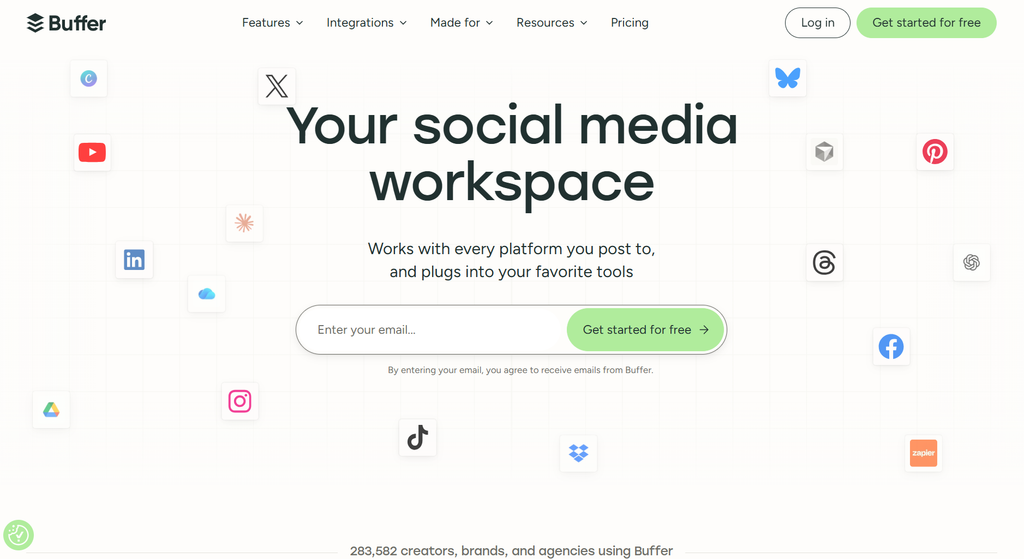
For example, a blogger can prepare several promotional posts for upcoming articles, schedule them in advance, and review their performance later. A small business can organize product announcements and promotional campaigns, while a content creator can manage several social accounts from one dashboard.
Buffer is not a complete replacement for every social media platform’s native tools. Instead, it focuses on simplifying the recurring tasks involved in maintaining an active social media presence.
Official website: https://buffer.com/
Key Features of Buffer
Buffer combines several social media management capabilities. The usefulness of each feature depends on the user’s publishing needs and selected subscription plan.
1. Social Media Scheduling
Social media scheduling is one of Buffer’s main features.
Users can prepare content ahead of time and assign it to a publishing schedule. This helps them maintain consistency without needing to publish every post manually.
For example, a business that wants to share three posts per week can prepare its content in advance and schedule each post for an appropriate date and time.
Benefits include:
- Plan social media content in advance.
- Reduce repetitive manual publishing tasks.
- Maintain a consistent posting schedule.
- Organize content across multiple connected accounts.
- Spend less time switching between social media platforms.
Publishing methods differ by network. Some content can be published automatically, while certain formats or account types may require a notification and manual completion in the social media app.
2. Multi-Platform Social Media Management
Managing several social accounts can become confusing, especially for creators who publish content on different platforms.
Buffer lets users connect supported social channels and manage their publishing workflow from one dashboard.
Supported networks include:
- TikTok
- YouTube
- Threads
- X, formerly Twitter
- Bluesky
- Mastodon
- Google Business Profile
- Substack
This makes Buffer useful for creators, bloggers, marketers, and small businesses that distribute content across multiple networks.
However, users should check the available features for each individual network before subscribing. Not every channel supports identical publishing formats, engagement tools, or analytics.
3. Content Calendar
Buffer’s content calendar helps users organize upcoming social media posts visually.
Instead of keeping track of publishing dates in separate documents or spreadsheets, users can review their planned content in one place.
A content calendar is particularly helpful when managing promotional campaigns, seasonal content, product launches, or recurring weekly posts.
Users can identify gaps in their publishing schedule, review upcoming content, and adjust their plans when necessary.
For example, a technology blog might plan a software review on Monday, a tutorial on Wednesday, and a comparison article on Friday. Buffer can help organize the social posts promoting each article.
4. AI Assistant for Content Creation
Buffer includes an AI Assistant that can help users refine and repurpose social media content.
Writing effective social media captions takes time. Users must communicate their message clearly while adapting their wording to different audiences and platforms.
AI-assisted writing can help generate caption ideas, improve existing drafts, and create alternative versions of a message.
Possible uses include:
- Brainstorming social media post ideas.
- Rewriting captions in a different tone.
- Turning a long article into shorter promotional content.
- Improving the clarity of a draft.
- Creating variations of an announcement.
For example, a blogger could use the AI Assistant to turn a detailed software review into a short LinkedIn post and a more conversational caption for another social network.
AI-generated content should still be reviewed before publishing. Users should check factual accuracy, tone, originality, and whether the content follows the rules of the intended platform.
5. Content Ideas and Drafts
Creating content consistently can be difficult when ideas are scattered across notes, documents, and messaging apps.
Buffer provides a place to save content ideas and drafts so users can develop them later.
This feature is helpful for people who plan content several days or weeks ahead. Rather than publishing an idea immediately, users can store it, refine it, and add it to their content schedule when appropriate.
Content ideas can also be organized using tags, making it easier to group posts by campaign, subject, or marketing objective.
For example, a digital marketing agency might organize ideas under categories such as tutorials, client success stories, product updates, and promotional campaigns.
The free plan includes a limited number of saved ideas, while paid plans offer more flexibility.
Also Read: MailMesh Review 2026: Features, Pricing, Pros, Cons & Alternatives
6. Social Media Analytics
Publishing content is only one part of social media marketing. Understanding how that content performs is equally important.
Buffer offers analytics that help users review engagement and audience performance across supported channels.
Depending on the connected network and subscription plan, users may be able to review metrics such as:
- Likes and comments.
- Impressions and reach.
- Shares and saves.
- Follower growth.
- Engagement rates.
- Individual post performance.
These insights can help users identify which topics attract attention and which publishing approaches deserve further testing.
For example, a business may discover that educational posts receive more engagement than promotional announcements. It can use that information to adjust its future content strategy.
Advanced analytics and reporting features are available on paid plans. Some measurements also depend on the data each social network makes available to third-party tools.
7. Community Engagement
Social media management does not end when a post goes live. Businesses and creators also need to respond to comments and interact with their audiences.
Buffer includes community engagement features that help users manage conversations from supported social channels.
Depending on the connected account and plan, users can reply to comments, organize saved replies, and use AI-assisted reply suggestions.
These tools can help small businesses respond more efficiently to recurring questions and maintain communication with their followers.
However, automated or AI-assisted responses should be checked carefully. Personal, sensitive, or complicated customer questions may require an individual response rather than a generic template.
8. Hashtag Management
Hashtags can help organize social media content and make posts easier to categorize.
Buffer’s paid plans include a hashtag manager that allows users to save and reuse hashtag groups.
This can save time for creators who regularly publish content about the same subjects.
For example, a technology blogger might maintain separate hashtag groups for AI tools, software reviews, productivity tips, and digital marketing.
Saved hashtags are convenient, but users should still choose tags relevant to each post instead of copying the same list everywhere.
9. Team Collaboration
Buffer’s Team plan is designed for organizations that need multiple people to participate in social media management.
Team features include additional users, access controls, and content approval workflows.
These capabilities can help teams coordinate responsibilities and review posts before publication.
For example, a marketing assistant might draft a promotional post, a content manager might review it, and an authorized team member might approve it for publishing.
The collaboration features are especially valuable for agencies and businesses that manage several clients or require approval before publishing brand-related content.
Solo creators who manage their own accounts may not need these additional capabilities.
10. Start Page
Buffer also provides a Start Page feature that can serve as a simple landing page for important links.
Creators can use a link-in-bio page to direct social media followers toward their websites, articles, products, newsletters, or other online resources.
This can be useful when a social network offers limited opportunities to include clickable links in individual posts or profile descriptions.
For example, a software review blogger could direct followers to a Start Page containing links to the latest reviews, popular articles, and the main website.
Availability and plan requirements should be checked before adding the feature to a publishing workflow.
Buffer Pricing in 2026
Buffer offers a free plan and two main paid plans: Essentials and Team. Paid subscriptions use per-channel pricing, meaning the total cost depends on how many social accounts you connect.
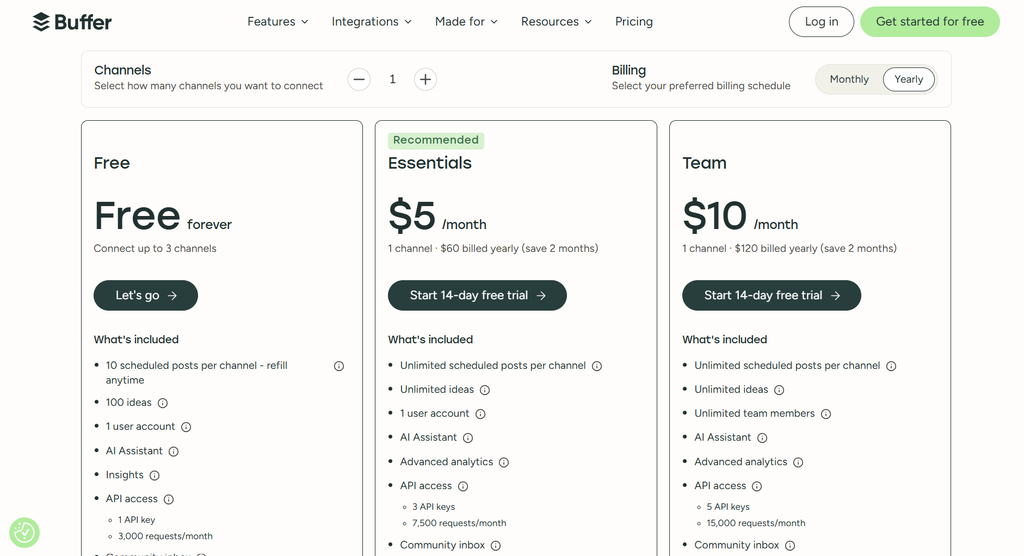
The following prices are based on Buffer’s published pricing information available for this review. Prices may change, and billing terms should be confirmed on the official pricing page before purchasing.
Buffer Pricing Plans
| Plan | Starting price | Best for |
|---|---|---|
| Free | $0 | Beginners and individual creators |
| Essentials | $5/month per channel when billed annually | Solo creators and small businesses |
| Team | $10/month per channel when billed annually | Teams and collaborative workflows |
The listed paid starting prices are for one channel with annual billing. Buffer’s pricing page also provides monthly billing options, and the total cost can change as you add more channels.
1. Free Plan
Buffer’s Free plan is designed for individuals who want to start managing social media without a subscription.
It includes:
- Up to three connected social channels.
- Up to 10 scheduled posts per channel at a time.
- Up to 100 saved content ideas.
- One user account.
- AI Assistant access.
- Basic insights.
- Community engagement features.
The free plan is a useful option for bloggers, beginners, and small creators who want to test the platform before spending money.
Its main limitation is the cap on scheduled posts and the reduced availability of advanced features. Users who manage many accounts or need detailed reporting may eventually need a paid plan.
2. Essentials Plan
Buffer’s Essentials plan is intended for individuals and small businesses that need more publishing flexibility.
Its starting annual-billing price is $5 per channel per month.
Features include:
- Unlimited scheduled posts, subject to the fair-use policy.
- Unlimited content ideas.
- Advanced analytics.
- AI-assisted content tools.
- Hashtag management.
- First-comment scheduling for supported channels.
- Community engagement features.
Essentials is worth considering if the free plan’s scheduling limit becomes restrictive or if more detailed analytics would improve your workflow.
However, it is primarily designed for one user. Businesses that need multiple people to review and approve posts should examine the Team plan.
3. Team Plan
The Team plan is designed for businesses, agencies, and marketing departments that collaborate on social media content.
Its starting annual-billing price is $10 per channel per month.
Features include:
- Unlimited scheduled posts, subject to the fair-use policy.
- Unlimited ideas.
- Multiple team members.
- Content approval workflows.
- Custom access and permissions.
- Advanced analytics.
- AI-assisted content tools.
- Community engagement features.
Team can be useful when several people share responsibility for content creation, review, and publishing.
For agencies managing multiple clients, the ability to assign access and organize approval workflows can help prevent publishing mistakes.
Is Buffer Pricing Affordable?
Buffer can be affordable for beginners because the free plan provides a practical way to start.
Paid pricing requires more careful consideration because costs depend on the number of connected channels.
For example, someone managing a few social profiles may find Essentials reasonably priced. An agency managing many profiles should calculate the total subscription cost before choosing a plan.
Visit the official pricing page for the latest channel-based rates:
Pros and Cons of Buffer
Before choosing Buffer, it is important to understand where the platform performs well and where it may fall short.
Buffer Pros and Cons
| Pros ✅ | Cons ❌ |
|---|---|
| Easy-to-use interface for beginners | Advanced features require a paid plan |
| Free plan available for up to 3 social channels | Costs increase when adding more channels |
| Supports multiple social media platforms | Publishing features vary by platform |
| AI Assistant helps create and improve captions | AI-generated content needs human review |
| Content calendar simplifies post planning | Not a complete marketing automation platform |
| Analytics help measure social media performance | Some analytics are limited by platform and plan |
| Scheduling saves time and supports consistency | Some posts require manual publishing |
| Team plan offers collaboration and approval workflows | Team collaboration requires a paid plan |
| Saved content ideas help organize future posts | May not meet every enterprise marketing need |
| Suitable for bloggers, creators, and small businesses | Total subscription costs can add up for agencies |
Buffer Alternatives
Buffer is not the only tool available for social media management. Several alternatives may be better suited to users with different requirements.
1. Hootsuite
Hootsuite is a social media management platform aimed at businesses and marketing teams that need a broader set of management and monitoring capabilities.
It is worth considering if your organization needs more extensive social media workflows. However, its pricing structure may be less attractive to beginners on a tight budget.
2. Later
Later focuses on visual social media planning and content scheduling. It may appeal to creators and businesses that prioritize visual content and Instagram-oriented marketing workflows.
Before choosing Later, compare the current supported platforms, scheduling limits, analytics, and subscription costs.
3. Metricool
Metricool combines social media planning with analytics and other digital marketing measurement features. It can be worth evaluating if reporting and performance analysis are central to your workflow.
Buffer may appeal more to users who prefer a straightforward publishing experience, while Metricool may suit users seeking more extensive marketing analysis.
4. Meta Business Suite
Meta Business Suite is a useful alternative for businesses that primarily manage Facebook and Instagram.
It provides publishing, scheduling, and other management capabilities for Meta platforms without requiring a paid Buffer subscription for those basic workflows.
Its main limitation is that it is centered on Meta’s ecosystem rather than providing the same cross-platform workflow as Buffer.
Buffer vs. Alternatives: Comparison Table
| Feature | Buffer | Hootsuite | Later | Metricool | Meta Business Suite |
|---|---|---|---|---|---|
| Free option | Yes | Check current availability | Check current availability | Yes, subject to limits | Yes |
| Multi-platform management | Yes | Yes | Yes | Yes | Primarily Meta |
| Post scheduling | Yes | Yes | Yes | Yes | Yes, for supported content |
| Analytics | Yes | Yes | Yes | Yes | Yes, for Meta platforms |
| AI-assisted features | Yes | Plan-dependent | Plan-dependent | Plan-dependent | Features may vary |
| Best suited for | Creators and small businesses | Businesses and marketing teams | Visual-content creators | Analytics-focused marketers | Facebook and Instagram users |
Features and free-plan limits can change, so verify the current offerings on each provider’s official website before making a decision.
Who Should Use Buffer?
Buffer is designed for a range of users who want to organize social media publishing.
Bloggers and Website Owners
Bloggers can use Buffer to schedule posts promoting new articles, tutorials, product reviews, and other website content.
For example, a technology website could publish a new software review and prepare several social media posts to attract readers over the following days.
Content Creators
YouTubers, independent creators, and influencers can use Buffer to plan announcements, share updates, and maintain a more consistent publishing schedule.
Creators who publish on multiple supported networks may find it especially useful.
Small Businesses
Small businesses can use Buffer to schedule product announcements, special offers, educational content, and customer updates.
The free plan is a reasonable starting point for businesses that have limited social media requirements.
Freelancers and Social Media Managers
Freelancers who manage social accounts for clients can use Buffer to organize publishing activities and review content performance.
Those who need multiple team members, client approvals, or customized access should evaluate the Team plan.
Marketing Teams
Marketing teams can benefit from shared workflows, content approvals, and access controls.
However, organizations requiring enterprise-level analytics, extensive advertising management, or advanced customer data integrations should compare Buffer with more comprehensive platforms.
How to Get Started With Buffer
Getting started with Buffer is relatively straightforward.
Step 1: Visit the official website
Go to https://buffer.com/ and review the platform’s available plans.
Step 2: Create an account
Register for an account and choose the free plan if you want to test the platform without committing to a paid subscription.
Step 3: Connect your social media accounts
Select the social channels you want to manage and follow the connection instructions.
Step 4: Create your first post
Write a caption, add supported media, and select the appropriate social channel.
Step 5: Schedule your content
Choose a suitable publishing date and time or add the post to your publishing queue.
Step 6: Review your content calendar
Check your upcoming posts to ensure your schedule is organized and that the content is appropriate for each network.
Step 7: Monitor performance
Review available analytics to understand how your content performs and use those insights to improve future posts.
Tips for Getting Better Results With Buffer
Using a scheduling tool does not automatically guarantee social media growth. The quality of your content and your understanding of your audience remain important.
Here are some practical ways to get more value from Buffer.
Create a weekly content plan. Decide which topics you want to cover before scheduling individual posts.
Adapt content for each platform. Avoid publishing identical captions everywhere without considering the audience and format.
Use AI as an assistant. Generate ideas and improve drafts, but check facts and revise the wording before publishing.
Review analytics regularly. Look for patterns in engagement and test different content formats.
Keep your schedule realistic. A manageable publishing routine is often more useful than creating a schedule you cannot maintain.
Respond to your audience. Scheduling posts should not replace genuine interaction with followers and customers.
Track your spending. Review the total cost of all connected channels before upgrading to a paid plan.
Final Verdict: Is Buffer Worth It in 2026?
Buffer is a practical social media management platform for bloggers, content creators, freelancers, and small businesses that want to organize their publishing workflow.
Its main strengths are its scheduling tools, content calendar, AI-assisted writing, social media analytics, and accessible free plan. The ability to manage supported social channels from one dashboard can reduce repetitive tasks and make content planning easier.
However, Buffer is not necessarily the right choice for every organization. The costs of connecting multiple channels can add up, publishing capabilities vary across social networks, and users who need extensive marketing automation may require additional tools.
Our recommendation: Start with Buffer’s free plan if you manage only a few social accounts. Consider Essentials when you need more scheduling capacity or advanced analytics, and choose Team when collaboration and approval workflows become important.
For creators and small businesses looking for a straightforward way to manage social media, Buffer is worth considering in 2026.
Try Buffer: https://buffer.com/
Pricing and feature information should be verified on Buffer’s official website before purchase.
Frequently Asked Questions About Buffer
Is Buffer free to use?
Yes. Buffer offers a free plan that supports up to three connected channels, 10 scheduled posts per channel at a time, and several content planning and management features. Paid plans provide additional functionality.
Is Buffer good for beginners?
Buffer can be a good option for beginners because it combines content scheduling, planning, and analytics in one platform. Its free plan also allows new users to explore the workflow before paying.
Does Buffer have AI features?
Yes. Buffer includes an AI Assistant that helps users develop ideas, refine drafts, and repurpose content. Users should review AI-generated material before publishing.
Which social media platforms does Buffer support?
Buffer supports multiple platforms, including Instagram, Facebook, LinkedIn, TikTok, YouTube, Pinterest, Threads, X, Bluesky, Mastodon, Substack, and Google Business Profile. Specific features vary by network and account type.
Can Buffer automatically publish social media posts?
Yes, Buffer supports automatic publishing for eligible accounts and content types. Some posts require notification-based publishing or manual completion in the relevant social media app.
Is Buffer worth paying for?
Buffer may be worth paying for if you regularly manage multiple social accounts and need more scheduling capacity, advanced analytics, or team collaboration. Users with simpler requirements may find the free plan sufficient.
What is the difference between Buffer Essentials and Team?
Essentials is designed primarily for individual users who want more publishing flexibility and advanced features. Team adds collaboration capabilities, including multiple users, approval workflows, and custom permissions.
Is Buffer better than Hootsuite?
Neither tool is automatically better for every user. Buffer is worth considering if you want a straightforward publishing workflow and channel-based pricing. Hootsuite may suit businesses with different management and monitoring requirements. Compare their current features and costs against your needs.
Can Buffer help grow a website?
Buffer can support website growth by helping you promote articles, distribute content, and maintain a consistent social media presence. However, it does not guarantee traffic or rankings. Results depend on content quality, audience relevance, distribution, and your broader marketing strategy.



1 Comment