

Adobe Firefly Review
From a basic AI picture generator, Adobe Firefly has developed into a more comprehensive creative AI platform for producing and modifying photos, movies, music, and other creative assets. Designers, marketers, content producers, video editors, and companies already utilizing Adobe’s creative ecosystem will find Firefly especially intriguing as it offers access to several AI models and new AI-assisted creative workflows in 2026.
But in 2026, will it be worthwhile to get Adobe Firefly?
To help you determine if Adobe Firefly is the best AI creative tool for you, we examine its features, cost, AI capabilities, usability, advantages, disadvantages, use cases, and alternatives in this review.
Our Adobe Firefly Rating
| Category | Our Rating |
|---|---|
| Ease of use | 9/10 |
| Features | 9.5/10 |
| AI Output | 9/10 |
| Image Generation | 9/10 |
| Video Generation | 8.5/10 |
| Audio Tool | 8.5/10 |
| Pricing | 8/10 |
| Adobe integration | 10/10 |
| Overall | 9/10 |
Table of Contents
About Adobe Firefly
The Adobe Firefly collection of generative AI tools was created especially for artistic endeavors. Firefly is designed with visual and multimedia production in mind, rather than just text generation.
Users can experiment with various visual concepts, make graphics from text prompts, edit pre-existing photos, produce audio and video, and incorporate AI-generated assets into more comprehensive Adobe workflows.
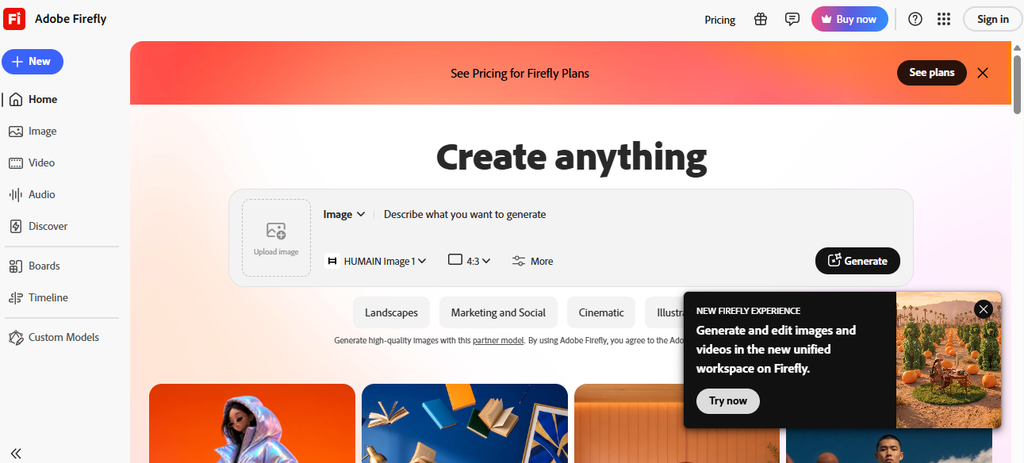
The fact that Firefly is a part of the Adobe ecosystem is one of its main advantages. Instead of switching between numerous unconnected AI tools, creators who already use Photoshop, Adobe Express, Premiere, Illustrator, or other Adobe applications can include Firefly into their current creative workflow.
Adobe has significantly expanded Firefly in 2026. In April 2026, Adobe announced Firefly AI Assistant and described Firefly as an all-in-one creative AI studio with more than 30 creative AI models and expanded image, video, audio, and editing capabilities.
The platform is aimed at a broad audience, including:
- Graphic designers
- Photographers
- Video creators
- Social media creators
- Marketing teams
- Content creators
- Agencies
- Small businesses
- Enterprise organizations
- Creative professionals
How We Evaluated Adobe Firefly
For this Adobe Firefly review, we evaluate the platform based on the areas that matter most when choosing an AI creative tool:
- Ease of use
- User interface
- Image generation quality
- Image editing capabilities
- Video generation
- Audio generation
- AI model selection
- Creative controls
- Adobe integration
- Speed
- Output quality
- Pricing and value
- Commercial usability
- Workflow flexibility
- Limitations
We also consider Firefly’s 2026 feature expansion and current pricing structure rather than evaluating it only as an AI image generator.
Adobe Firefly Features
Adobe Firefly provides much more than just text-to-image conversion. Several aspects of creative production are covered by its present feature set.
1. AI Image Generation
With Firefly’s picture production capabilities, users can create visual notions from the prompt and utilize natural language to describe an image.
For instance, a user might ask for:
“A cinematic product advertisement for a luxury black smartwatch on a futuristic glass table.”
Firefly can then generate visual variations that can be refined through additional prompts and controls.
Image generation is useful for:
- Advertising concepts
- Social media graphics
- Product concepts
- Blog illustrations
- Marketing campaigns
- Mood boards
- Concept art
- Background creation
- Creative experimentation
One advantage of Firefly is that image generation is connected to Adobe’s broader editing ecosystem, allowing AI-generated ideas to become part of a more traditional professional design workflow.
2. Generative Fill
Generative Fill is one of Firefly’s most useful capabilities for professional image editing.
Instead of generating an entire image from scratch, users can select part of an existing image and use AI to add, remove, or modify elements.
For example, you can use AI to:
- Remove unwanted objects
- Add new objects
- Expand an image
- Change backgrounds
- Modify visual elements
- Create variations of an existing composition
This makes Firefly particularly useful for photographers, designers, advertisers, and marketers who need to edit existing assets rather than constantly create new ones.
3. AI Video Generation
Firefly has expanded beyond still images into AI video creation.
Users can generate video content from prompts and use AI-assisted tools for creative video workflows.
Video generation can be useful for:
- Social media videos
- Marketing campaigns
- Product demonstrations
- Storyboards
- Concept videos
- Short-form content
- Creative experiments
- Background footage
Adobe’s current plans show different video-generation limits depending on the subscription tier, with higher plans providing substantially more generative capacity.
Firefly’s video capabilities are especially interesting for Adobe users because AI generation can become part of a larger professional video-production workflow rather than remaining an isolated generation tool.
4. AI Audio Generation
In 2026, Firefly also expanded its audio capabilities.
Adobe now offers AI tools for:
- Generate Music
- Generate Sound Effects
- Generate Speech
These tools are designed to help creators produce audio for videos and marketing content without having to source every audio element separately.
Recent testing reported that Firefly’s Generate Music tool can be particularly useful for quickly producing tracks based on prompts or video context, while Generate Speech and Generate Sound Effects provide additional production options.
This makes Firefly increasingly useful for creators who want to build complete multimedia content rather than only generate images.
5. Multiple AI Models
Another major Firefly development in 2026 is its broader model ecosystem.
Firefly isn’t limited exclusively to a single Adobe model. Adobe has expanded access to partner generative AI models within Firefly, giving users more choice when producing creative content. Adobe’s current plan information references models from partners including Google, OpenAI, and Flux, among others.
This approach is important because different AI models can produce different styles and results.
Instead of switching between several AI websites, creators can increasingly experiment with different models from a single creative environment.
6. Firefly Boards
Firefly Boards is designed for visual ideation and creative exploration.
It can help creators collect ideas, experiment with concepts, and develop visual directions before committing to a final design.
This is particularly useful for:
- Mood boards
- Campaign concepts
- Brand exploration
- Story development
- Design brainstorming
- Creative presentations
For professional teams, this can make Firefly more than an image generator—it becomes part of the early planning stage of a creative project.
7. Firefly AI Assistant
One of the most significant Firefly developments announced in 2026 is Firefly AI Assistant.
Adobe describes it as a creative agent that can understand a user’s desired outcome and orchestrate complex workflows across Adobe applications and generative AI models.
Instead of manually performing every step, a creator can describe what they want and allow the assistant to help execute the workflow.
Adobe says the assistant is designed to work across applications including Firefly, Photoshop, Premiere, Lightroom, Express, and Illustrator.
This represents a broader shift from traditional “prompt and generate” AI toward AI-assisted creative workflows.
Adobe Firefly Pricing
Adobe currently offers a free Firefly option alongside several paid plans.
According to Adobe’s current pricing information, the main individual plans are Firefly Standard, Firefly Pro, Firefly Pro Plus, and Firefly Premium.
| Plan | Price | Generative Credits | Best For |
|---|---|---|---|
| Firefly Free | Free | Limited daily generations | Beginners and casual users |
| Firefly Standard | $9.99/month | 2,000/month | Regular creators |
| Firefly Pro | $19.99/month | 4,000/month | Professional creators |
| Firefly Pro Plus | $49.99/month | 10,000/month | Heavy creative users |
| Firefly Premium | $199.99/month | 50,000/month | High-volume professionals |
Pricing and available offers can change, so users should confirm the current price before purchasing. Adobe’s current plans page also shows promotional pricing for some tiers at certain times.
Pricing Checked: 11/September/2026
Adobe Firefly Pros and Cons
| Pros | Cons |
|---|
| Excellent Adobe integration | Expensive at higher tiers |
| Strong image generation | Credit system can be confusing |
| Powerful Generative Fill | Video generation can consume credits quickly |
| AI video capabilities | Some advanced features require paid plans |
| AI audio tools | May be excessive for casual users |
| Multiple AI models | Large number of features can feel overwhelming |
| Photoshop integration | Not the cheapest AI creative platform |
| Good for professional workflows | Best value is usually for Adobe users |
| Suitable for businesses | Some features vary by plan |
Who Should Use Adobe Firefly?
Adobe Firefly is best suited for people who need AI as part of a broader creative workflow.
Designers
Graphic designers can use Firefly for concept development, image generation, background replacement, object removal, and creative experimentation.
Photographers
Photographers can use Generative Fill and AI editing capabilities to make changes to photographs without manually performing every editing task.
Marketers
Marketing professionals can use Firefly to quickly create campaign visuals, social media content, advertisements, product concepts, and video assets.
Video Creators
Video creators can benefit from AI-generated video, music, speech, and sound effects.
Agencies
Creative agencies can use Firefly to produce concepts and marketing assets for multiple clients while keeping their work connected to professional Adobe tools.
Businesses
Businesses that already use Adobe products can potentially get more value from Firefly because AI generation becomes part of an existing creative workflow.
However, casual users who only want to generate a few AI images each month may not need Firefly’s full ecosystem.
Adobe Firefly Use Cases
Social Media Content
Firefly can help social media managers create images, backgrounds, promotional graphics, and short video concepts quickly.
Instead of designing every asset manually, teams can use AI to generate initial concepts and then refine them.
Advertising
Advertising teams can use Firefly to explore multiple visual concepts before producing a final campaign.
This can reduce the amount of time spent creating early-stage concepts.
Product Marketing
Businesses can create product scenes, promotional imagery, backgrounds, and campaign concepts without photographing every possible variation.
Image Editing
Firefly is especially useful when an existing image needs modification.
For example, a marketer could remove an unwanted object, expand an image to fit a different aspect ratio, or create a new background.
Video Production
Firefly’s video and audio tools can help creators produce supporting content for social media, advertising, product demonstrations, and other digital campaigns.
Creative Brainstorming
Firefly Boards and generative tools can be used during the early stages of a creative project to explore multiple directions quickly.
Adobe Firefly Alternatives
Firefly is powerful, but it isn’t necessarily the best AI creative platform for everyone.
| Adobe Firefly Alternative | Best For | Starting Price |
|---|---|---|
| Midjourney | AI image generation and artistic visuals | Varies |
| ChatGPT | General AI, image creation, writing and research | $20/month |
| Canva | Simple design and AI-powered content creation | Free/Paid plans |
| Runway | AI video generation and editing | Free/Paid plans |
| Ideogram | AI images and text-heavy designs | Free/Paid plans |
| Leonardo AI | Image generation and creative assets | Free/Paid plans |
Conclusion
Adobe Firefly is one of the most complete AI creative platforms available in 2026.
Its biggest strength is not simply image generation. The real advantage is the combination of AI generation, professional editing, video, audio, multiple AI models, and Adobe Creative Cloud integration.
Firefly is particularly valuable for designers, photographers, marketers, video creators, agencies, and businesses already using Adobe products.
Who Should Buy adobe Firefly?
Adobe Firefly is worth considering if you:
- Regularly create visual content
- Use Photoshop or Adobe Express
- Need AI image editing
- Create marketing graphics
- Produce video content
- Need AI-generated audio
- Work on creative projects professionally
- Want multiple AI models in one creative environment
Do Aitoolbiz Recommend Adobe Firefly?
Yes.
We recommend Adobe Firefly for professional creators, designers, marketers, agencies, and businesses that want AI integrated into a professional creative workflow.
For casual users who only need occasional AI images, a simpler or cheaper alternative may offer better value.
FAQ
What is Adobe Firefly?
Adobe Firefly is Adobe’s generative AI platform for creating and editing images, videos, audio, and other creative content. It is designed to work alongside Adobe’s creative ecosystem.
Is Adobe Firefly free?
Yes. Adobe offers a free Firefly plan with limited daily generations. Paid plans provide additional generative credits and access to more advanced features.
How much does Adobe Firefly cost?
Adobe’s current individual plans include Firefly Standard at $9.99/month, Firefly Pro at $19.99/month, Firefly Pro Plus at $49.99/month, and Firefly Premium at $199.99/month. Prices and promotional offers can change.
Is Adobe Firefly worth it?
Firefly is worth considering if you regularly create images, video, audio, or marketing content and already use Adobe products. Its value is much greater for professional creators than for occasional users.
Is Adobe Firefly better than Midjourney?
It depends on your needs. Midjourney is highly focused on AI image generation and artistic output, while Firefly provides a broader professional creative ecosystem with image editing, video, audio, and Adobe integration.
Is Adobe Firefly better than ChatGPT?
Neither is universally better. ChatGPT is more versatile for general-purpose AI tasks such as writing, research, coding, analysis, brainstorming, and conversation. Firefly is more specialized for professional creative production.




3 Comments