Dripwriter Review
If you regularly work with Google Docs and want your writing to appear gradually instead of showing up as one large copy-and-paste action, you may have come across Dripwriter.
Dripwriter is a Google Docs auto-typing and writing-pacing tool designed to gradually add your existing text to a document over a period of time. Instead of pasting an entire draft into Google Docs at once, you can paste the text into Dripwriter, choose a duration, and let the platform add it to your document according to that schedule.
But is Dripwriter actually worth using in 2026?
In this Dripwriter review, I’ll explain what the tool does, how it works, its main features, pricing, pros and cons, privacy considerations, and who it may be suitable for.
Table of Contents
What Is Dripwriter?
Dripwriter is an online tool designed to gradually type your existing text into Google Docs.
The basic idea is straightforward. You provide the text, select how long you want the process to take, connect the appropriate Google Doc, and Dripwriter gradually inserts the content instead of adding everything at once.
According to Dripwriter, the service does not generate or rewrite your content. The text comes from the user, while Dripwriter controls how and when that text is entered into Google Docs.
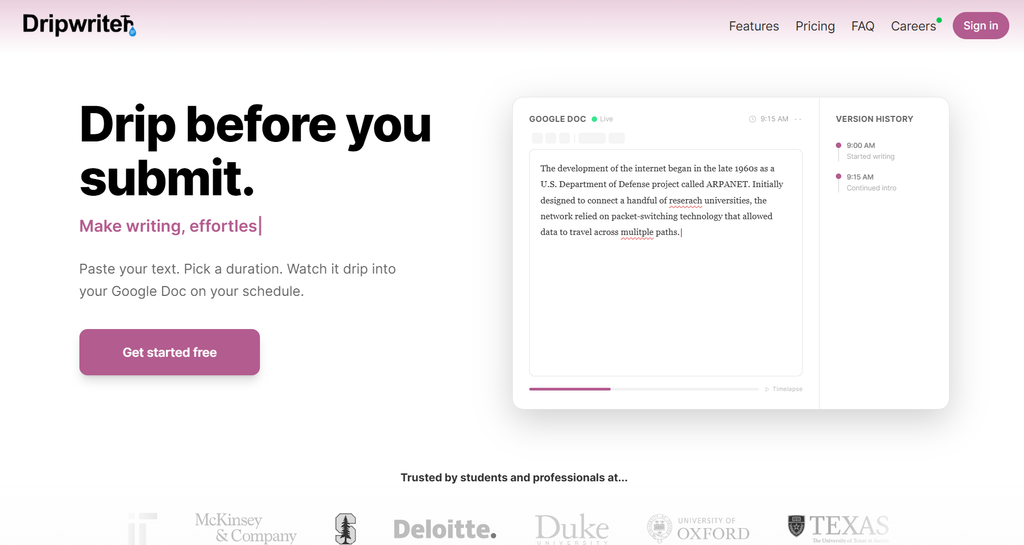
The platform is particularly focused on creating a gradual document-editing timeline. Its features include pacing controls, word-by-word typing, revision-style edits, pauses, background dripping, and Google Docs version-history functionality.
So, unlike an AI writing assistant such as Jasper, Dripwriter isn’t primarily designed to create content for you.
It is more accurately described as a Google Docs auto-typing and document-pacing tool.
How Does Dripwriter Work?
Dripwriter keeps the process relatively simple.
First, you paste your existing draft into the Dripwriter interface. You can use an essay, article, assignment, report, or other piece of text.
Next, you choose the total duration for the drip. Depending on your plan, the available duration can range from shorter sessions to periods of up to one week.
Finally, Dripwriter gradually enters the text into your Google Doc according to the schedule you selected.
The company describes the process as having natural pauses, typing variation, word-by-word options, typo corrections, and revision-style activity.
Step 1: Paste Your Draft
The first step is to provide the text you want to add to Google Docs.
Dripwriter doesn’t claim to write the underlying content for you. Your original text remains the source of the document.
Step 2: Choose a Duration
You then select how long the process should take.
Shorter durations make the text appear faster, while longer durations spread the activity across a larger period.
The Free plan currently supports drips of up to one hour, while Pro supports custom durations of up to one week.
Step 3: Let Dripwriter Type
Once the session begins, Dripwriter gradually adds the text to the selected Google Doc.
The service also supports background dripping, meaning you don’t necessarily have to keep the browser tab open while the session is running.
Dripwriter Features
Dripwriter’s feature set is focused on one specific job: gradually getting your existing text into Google Docs.
Here are some of its main features.
Google Docs Auto Typer
The core feature is automatic typing into Google Docs.
Rather than placing the entire draft into a document immediately, Dripwriter spreads the writing activity across your chosen time period.
This is the primary reason someone would use the platform.
Word-by-Word Typing
Dripwriter offers word-by-word typing for users who want a more granular typing process.
Instead of simply adding larger chunks of text, the tool can enter individual words progressively.
According to the company, this is intended to create a more detailed playback and version-history trail.
Natural Pauses and Pacing
Another important feature is pacing.
Dripwriter says it can introduce variations in typing speed, pauses between sentences, and paragraph-level rhythm rather than simply inserting text at a constant speed.
This makes the tool different from a basic paste operation.
Typo and Revision Features
The Pro plan includes features designed around typo and revision activity.
Dripwriter says it can introduce planned typos, corrections, and revision-style edits as part of the writing process.
It also includes an end-of-session revision sweep on Pro.
These features are intended to make the document’s editing history more detailed.
Version History
Version history is a major part of Dripwriter’s product positioning.
Instead of having a Google Doc that shows one large paste at a particular moment, Dripwriter spreads activity over the selected session.
The company also advertises version-history analysis and writing playback features on its paid plans.
Background Dripping
One of the more convenient features is background dripping.
Dripwriter says that sessions can continue even after you close the browser tab or put your computer to sleep because the process runs server-side.
That means you don’t have to sit in front of the document waiting for the process to finish.
Pause and Resume
Dripwriter also supports pausing and resuming sessions.
According to its features page, progress can be saved so users can continue from where they stopped rather than starting the entire process again.
Existing Google Docs
You can use Dripwriter with an existing Google Doc rather than always creating a new document.
This is available with restrictions on the Free plan and without that limitation on Pro and Day Pass plans.
Also Read: Stable Diffusion Review 2026: Features, Pricing & Pros and Cons
Dripwriter Pricing
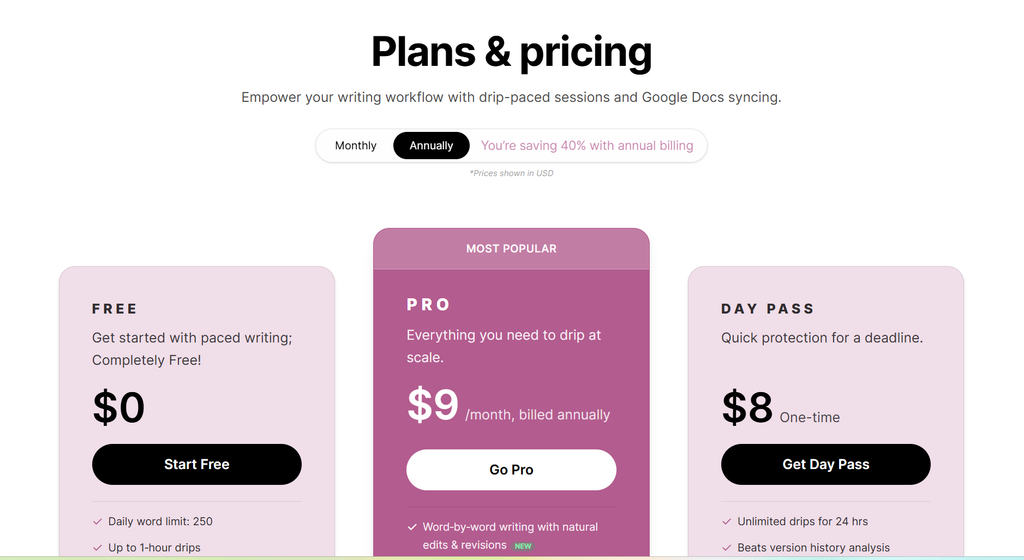
| Plan | Price | Daily Word Limit | Max Drip Duration | Background Drips | Existing Google Doc | Active Drips |
|---|---|---|---|---|---|---|
| Free | $0 | 250 words | Up to 60 min | ✓ | First 3 days | 1 |
| Pro | $9/month billed annually | Unlimited | Up to 1 week | ✓ | Unlimited | Up to 3 |
| Day Pass | $8 one-time | Unlimited | Up to 1 day | ✓ | Unlimited | 1 |
Dripwriter Pros and Cons
| Pros | Cons |
|---|---|
| Free plan available | Free plan is limited to 250 words per day |
| Works directly with Google Docs | Mainly useful for a specific Google Docs workflow |
| Supports background dripping | Full feature set requires a paid plan |
| Word-by-word typing available on Pro | Pro costs $9/month when billed annually |
| Offers custom drip durations up to one week on Pro | It does not generate or rewrite content |
| Pause and resume functionality | Day Pass access is limited to 24 hours |
| Supports existing Google Docs | Paid purchases are generally non-refundable |
| Includes revision and version-history features on paid plans | Not a replacement for an AI writing or content-generation tool |
| Day Pass available for occasional users | Some advanced features are restricted to Pro |
| Uses OAuth and says it only accesses selected Google Docs | Requires connecting your Google account for Google Docs functionality |
Is Dripwriter an AI Writing Tool?
Not in the traditional sense.
Dripwriter specifically says it does not generate, rewrite, or suggest text.
That distinction is important.
If you’re looking for a tool that can generate blog posts, rewrite paragraphs, create marketing copy, or brainstorm ideas, Dripwriter isn’t designed for those jobs.
Instead, its purpose is to take text you already have and gradually enter it into Google Docs.
So it is better categorized as a Google Docs auto typer or writing-pacing tool than as a conventional AI writer.
Does Dripwriter Bypass AI Detectors?
No.
Dripwriter explicitly states that it is not an AI humanizer and does not bypass AI detectors.
The company says it doesn’t transform AI-generated text into human-written text and doesn’t modify the underlying content.
This is an important distinction because some people may confuse gradual typing with AI text detection.
Changing the way text enters a document is not the same thing as changing the underlying writing.
Therefore, Dripwriter should not be treated as an AI detector bypass or AI-humanization service.
Is Dripwriter Safe?
Safety and privacy are important considerations whenever you connect an application to Google Docs.
According to Dripwriter’s privacy policy, the service accesses the specific Google Docs that you explicitly select or create through the platform rather than your entire Google Drive.
The company also says that it does not sell your document contents and does not use Google user data or document content to train generalized AI models.
Dripwriter uses Google APIs for the integration, and its privacy policy says its use of Google user data follows Google’s API Services User Data Policy, including Limited Use requirements.
That said, users should still review the privacy policy and terms of any third-party service before connecting their Google account.
Is Dripwriter Legit?
Dripwriter operates as a commercial software service under Dripwriter LLC.
Its website provides pricing information, Terms of Service, Privacy Policy, and support contact information. Its Terms of Service were updated on April 24, 2026.
The product’s advertised functionality is also clearly defined.
It doesn’t claim to be a full AI writing platform. Instead, it focuses on gradually adding user-provided text to Google Docs.
Whether the service is useful for you depends largely on whether you actually need that functionality.
Who Is Dripwriter Best For?
Dripwriter is most relevant to people who specifically need automated, scheduled typing into Google Docs.
For example, it may be useful to:
- Writers working with long Google Docs drafts
- Users who want scheduled document entry
- People who need background typing
- Users who want gradual version-history activity
- People working with existing Google Docs
- Users who only need the service occasionally and prefer a Day Pass
However, someone looking for AI-generated content will need a different type of tool.
Dripwriter doesn’t generate the underlying article, essay, report, or assignment.
Is Dripwriter Worth It?
Whether Dripwriter is worth the money depends on how often you need its specific features.
If you only need to put text into Google Docs occasionally, the Free plan or $8 Day Pass may be enough.
If you regularly need longer sessions, background dripping, custom durations, unlimited words, or the additional version-history features, the Pro plan provides substantially more functionality.
However, it’s important to understand what you’re paying for.
Dripwriter isn’t a content generator.
It doesn’t replace a writing assistant, grammar checker, or AI copywriting platform.
Its value comes from automating the process of gradually entering your existing content into Google Docs.
Conclusion
Dripwriter is a highly specialized tool rather than an all-purpose writing platform.
Its main purpose is simple: take text you provide and gradually enter it into Google Docs according to a schedule.
The platform adds several features around that core idea, including word-by-word typing, natural pacing, revision-style edits, background dripping, pause-and-resume functionality, and version-history tools.
The Free plan makes it possible to test the basic functionality without paying, while the Pro plan adds unlimited words, longer and custom sessions, multiple active drips, and additional editing and playback features. There is also a $8 Day Pass for short-term use.
The biggest thing to remember is that Dripwriter isn’t an AI writer or AI humanizer. It doesn’t create or rewrite your content.
If you’re specifically looking for a Google Docs auto-typing and document-pacing tool, Dripwriter is built around that use case.
If you’re looking for a tool that writes articles, rewrites content, or generates ideas, you’ll need a different solution.
Frequently Asked Questions About Dripwriter
What is Dripwriter?
Dripwriter is a Google Docs auto-typing tool that gradually adds user-provided text to a Google Doc over a selected period.
Is Dripwriter free?
Yes. Dripwriter has a Free plan with a 250-word daily limit and drips of up to 60 minutes.
How much does Dripwriter cost?
The current paid options include Pro at $9 per month when billed annually and a $8 one-time Day Pass.
Does Dripwriter write content?
No. Dripwriter says it doesn’t generate, rewrite, or suggest text. The content comes from the user.
Does Dripwriter work with Google Docs?
Yes. Google Docs is the core platform that Dripwriter integrates with.
Can Dripwriter work in the background?
Yes. Background dripping is available, allowing a session to continue without keeping the Dripwriter tab open.
Can I use an existing Google Doc?
Yes. Existing Google Docs can be used, with the Free plan having a limited access period and paid plans offering broader access.
Can I cancel Dripwriter?
According to Dripwriter, subscriptions can be upgraded, downgraded, or canceled through the account.